
View full specs
In this Kodak PixPro AZ425 review, I’m looking past the big zoom headline. The real question is how this bridge camera performs in everyday shooting. If you want an affordable all-in-one camera for travel, family moments, or casual wildlife, this is where its strengths and limits become clear.
Retail listings often shorten the name to Kodak AZ425, so I use that wording once here as a search and shopping variation. For manufacturer specs and downloads, see the official Kodak PIXPRO AZ425 product page.
Who the Kodak PixPro AZ425 is really for
If you want more flexibility than a smartphone, the Kodak PixPro AZ425 sits in a useful middle ground. It gives you a real grip, a long optical zoom, and simple controls. As a budget bridge camera, it is aimed squarely at beginners and casual photographers. If you want to zoom in at the zoo, on holiday, or during family events, it offers a lot for the price.
The AZ425 is most appealing if your phone feels too short on reach. Its 42x optical zoom moves from wide landscapes to close-ups of birds or distant details. You do not need to swap lenses or carry extra gear. For parents, travelers, and hobbyists, that makes it easy to understand.
This camera is not designed for professionals. It is also not the right tool for rapid-fire action or premium low-light work. Instead, it suits people who value convenience, versatility, and affordability. If you want something simple beyond point-and-shoot basics, the AZ425 is a natural step up.
Design, handling, and day-to-day usability
How the body feels in hand
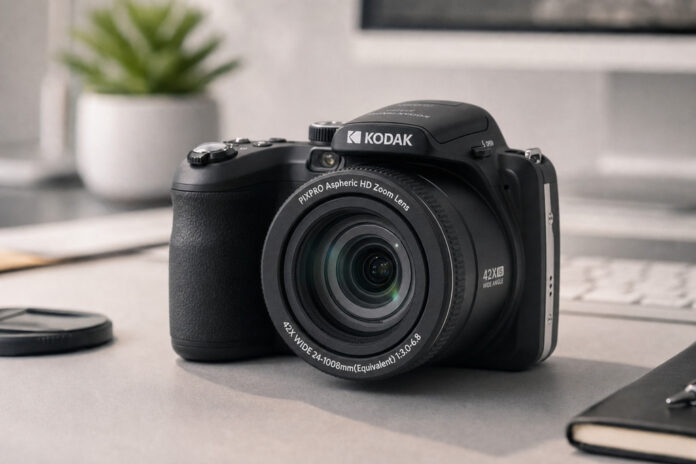
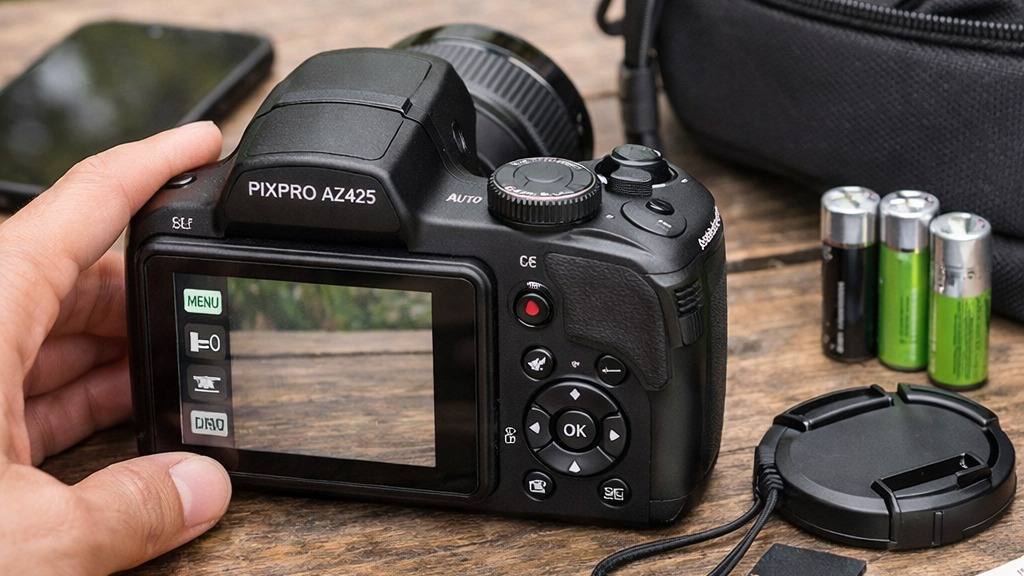
The Kodak PixPro AZ425 follows the classic bridge camera shape. It has a substantial grip and a lens that extends far out from the body. In the hand, it feels lighter than a DSLR but more substantial than a typical compact. The grip is comfortable and deep enough for stability, even when the lens is fully extended.
Most of the body is plastic, which keeps the weight down. It still feels solid enough for daily outings or travel. The button layout is straightforward, with most controls close to your thumb and forefinger. After a couple of hours, I did not notice much fatigue. That matters on long walks or while chasing kids around a playground.
The LCD screen is fixed and has no touch input. That is limiting if you like tilting screens for awkward angles. There is also no electronic viewfinder for harsh sunlight. For most eye-level shooting, though, the rear screen is clear enough outdoors.
Menu system, controls, and shooting experience
The AZ425’s menu system is simple and easy to navigate. That makes it approachable for first-time camera users. You get familiar icons and clear options for resolution, drive mode, and white balance. Customization is limited, but for beginners that can be a benefit.
Physical controls include a mode dial for auto, scene modes, and limited manual control. Scene presets cover common subjects like portraits, landscapes, and night scenes. They help beginners get better results without deep technical knowledge. The zoom rocker around the shutter button is responsive and easy to use.
Day-to-day, the camera is quick to start up and ready for action in just over a second. The shutter response is decent in good light, but there is a slight delay in lower light settings. Navigating playback and settings is intuitive, so you won’t waste time hunting for features. For travel or family outings, this ease of use means you can focus on capturing the moment rather than fiddling with settings.
Lens range and what the 42x zoom means in practice
Wide-angle to telephoto shooting scenarios
The standout feature of the Kodak PixPro AZ425 is undoubtedly its lens. The 42x optical zoom covers a focal range from 24mm wide-angle to 1008mm equivalent. In real-world terms, this means you can shoot everything from group photos and landscapes to distant wildlife without moving your feet.
At the wide end, the lens fits a lot into the frame, making it useful for cityscapes or indoor scenes where you can’t back up. The other extreme is where the AZ425 separates itself from smartphones and many compacts. At 1008mm, you can zoom in on a bird high in a tree, the details of a distant building, or capture candid moments from across a park.
In practice, using the lens at full zoom does require a steady hand. The built-in optical image stabilization helps, but for maximum sharpness, especially in lower light, you may want to brace yourself or use a tripod. The zoom is motorized and reasonably quiet, so you won’t disturb your subjects or draw attention during candid shooting.
This wide zoom range is the main reason to choose a bridge camera like the AZ425. It opens up creative opportunities, from wide vistas to intimate close-ups, without the hassle or expense of carrying multiple lenses. For travel, safaris, or even backyard birdwatching, having that reach in your bag adds a lot of value.
Image quality in good light and challenging conditions
Detail, color, and noise performance
The Kodak PixPro AZ425 uses a 1/2.3-inch BSI CMOS sensor with 20 megapixels. In bright daylight, it produces pleasing images with good color and decent detail. Greens and blues look lively outdoors. Faces keep natural skin tones, and the JPEG processing is tuned for sharing and prints rather than heavy editing.
At wide angle, images are sharp in the center. The edges are softer, which is normal for bridge cameras in this range. As you zoom in, sharpness drops a little. In good light, though, the results remain usable for prints and online sharing.
Low-light limits
When light levels drop, the small sensor shows its limits. In overcast conditions or indoors, you will see more noise and less dynamic range. ISO performance is modest. Anything above ISO 800 starts to lose fine detail. Low-light shots work best with static subjects or scenes where you can use flash.
For everyday photography, the AZ425 is more convincing. It works well for outdoor events, travel, and bright interiors. If you are upgrading from a basic compact or a phone, you will appreciate the extra reach and control. In dim conditions, keep your expectations realistic or use the built-in flash.
Overall, the Kodak PixPro AZ425 image quality is solid for its class. Color is vibrant, and detail is good in favorable light. It will not match a larger-sensor camera in low light. For budget bridge camera buyers, though, it delivers where it matters most: outdoor, travel, and everyday photos.
Autofocus, burst shooting, and overall performance
Focus speed and accuracy
The Kodak PixPro AZ425 autofocus needs realistic expectations. Bridge cameras in this price range are not built for sports or fast action. They are built for family use, travel, and casual wildlife. In daily use, the AZ425 uses a simple contrast-detection autofocus system. Center-point focus is the most reliable choice, especially at the long end of the zoom. Auto mode locks well enough on bright subjects, and face detection works for group photos and portraits.
However, the autofocus can struggle in low light or with subjects that move quickly. There is a noticeable pause while the camera hunts for focus, especially if you zoom in to 300mm or beyond. This is typical for bridge cameras at this price, but it means you need some patience for candid shots. For best results, half-press the shutter first. Give the camera a moment to lock focus, then press fully to take the shot.
Looking at Kodak AZ425 performance overall, the camera is responsive enough for relaxed shooting. Startup takes about two seconds, which is acceptable for most situations. Menu navigation is direct, with clear icons and a simple button layout. Built-in scene modes also help. Landscape, portrait, and panning modes give beginners useful shortcuts without requiring manual control.
Burst shooting limits
Burst shooting helps with action, even if the subject is only a child playing or a dog running in the yard. The Kodak AZ425 burst mode is modest. It can shoot up to 3 frames per second, but only for a short burst of five shots. After that, the camera needs time to write to the memory card. You will notice a pause before shooting again.
This is not suited to serious sports photography. It can still help you catch a smile or a bird leaving a feeder if your timing is good. Compared with a phone, it feels slower. The advantage is that you can zoom much closer to distant subjects.
Despite these limits, the overall experience is positive if you manage expectations. The AZ425 is dependable for travel, zoo visits, and slower subjects. It works best when framing flexibility matters more than speed. In good light, and with patience, you can capture images that would be difficult with a phone.
Video features, stabilization, and battery life
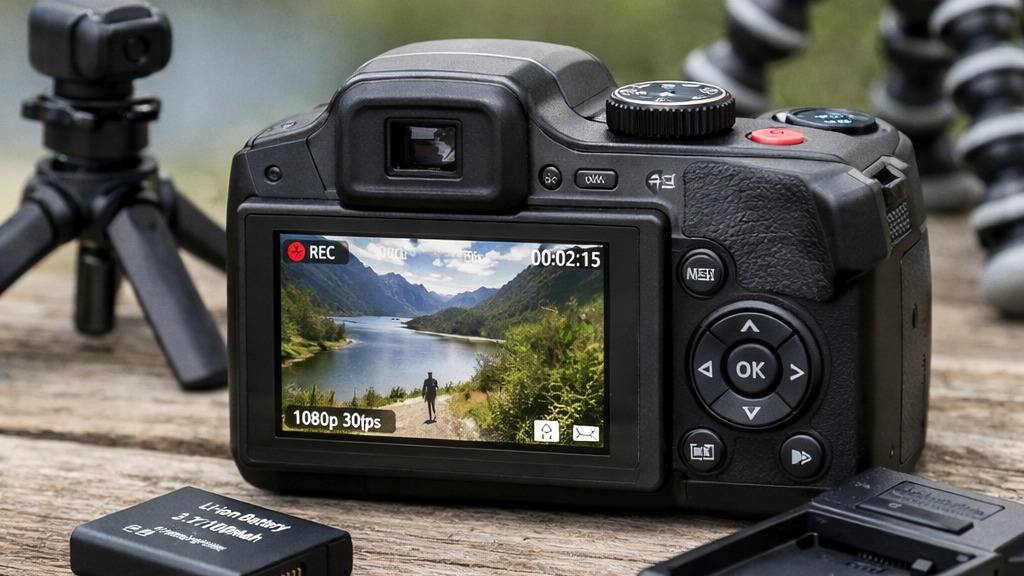
The video capabilities of the Kodak PixPro AZ425 are basic but functional. If you want cinematic quality or advanced frame rates, look elsewhere. For casual family clips, travel footage, or simple wildlife videos, the AZ425 is straightforward.
What to expect for casual 1080p video recording
The Kodak PixPro AZ425 video mode records Full HD 1080p at 30 frames per second. It also offers 720p at 60 or 30 frames per second. In 2026, that is still basic. It is fine for casual sharing and family clips.
The main advantage is zoom. You can record distant subjects, like a deer across a field or a street performer, much closer than with a phone. The zoom works while filming, but it is not silent. In quiet environments, the lens motor can be audible.
Stabilization and battery life
Stabilization comes from optical image stabilization in the lens. It helps reduce shake, especially at longer focal lengths. It is still basic compared with more expensive cameras, but it makes handheld shooting easier.
At the wide end, handheld video is reasonably steady. As you zoom in, small hand movements become more obvious. For the best results, brace your arms, use a monopod, or rest the camera on a solid surface.
Battery life is another useful point. The camera uses the LB-060 lithium-ion battery and is rated at about 240 shots. Real-world results depend on zoom use, screen time, and video. For a day trip, one battery is usually enough if you mostly shoot stills. Video drains it more quickly, so a spare LB-060 is sensible. The battery charges in-camera over micro USB, which is convenient for travel.
In short, the Kodak AZ425 video features are built for casual users. You can expect usable clips and decent battery life for day trips. It is not meant for professional video work or low-light vlogging.
Pros, cons, and how it compares with smartphone shooting
For context inside Kodak’s zoom lineup, compare it with our Kodak PixPro camera guide, the cheaper Kodak PixPro AZ405 review, and the lower-zoom Kodak Pixpro AZ255 review.
Comparing the Kodak PixPro AZ425 with a modern smartphone shows the trade-off clearly. The Kodak wins on reach and handling. The phone wins on speed, sharing, and low-light processing. Here is the practical breakdown:
Pros:
- Incredible 42x optical zoom lets you capture subjects far beyond the reach of any smartphone.
- Dedicated camera ergonomics, including a good grip and physical controls, make it easier to hold steady at long focal lengths.
- Simple, approachable menu system helps beginners learn the basics of photography without being overwhelmed.
- Built-in scene modes and face detection improve results for portraits and travel snapshots.
- Decent battery life for a budget bridge camera, especially compared to some older compacts.
Cons:
- Autofocus is slower and less reliable than even mid-range smartphones, especially in low light or at long zooms.
- Image quality drops quickly as light fades, with visible noise and softness at higher ISO settings.
- Burst mode is limited, making it hard to capture fast action or fleeting moments.
- 1080p video and basic stabilization still lag behind modern phone cameras in smoothness, dynamic range, and convenience.
- The display is basic, with no touch controls, no tilt, and no viewfinder backup.
AZ425 vs smartphone
When weighing the AZ425 vs smartphone, the biggest reason to pick the Kodak is zoom reach. No phone can truly match the AZ425’s 42x optical zoom for wildlife, distant architecture, or candid moments from afar. Flagship phones with periscope lenses are impressive, but they still rely heavily on processing.
If you mostly shoot wide or normal angles, your phone will usually be better. It will also be faster for sharing, editing, and low-light snapshots.
As a cheap zoom camera, the AZ425 is a focused tool. It is not meant to replace your phone for everyday shooting. It is best as a companion for situations where reach and handling matter most.
Final verdict: is the AZ425 worth buying?
So, is Kodak PixPro AZ425 worth it? For readers who want more creative reach without spending much, it can make sense. The answer depends on your priorities.
If you want to zoom in on distant subjects, the AZ425 is hard to beat at its price point. It works for travel, casual birding, and photographing kids from across a park. It also gives you a true optical zoom experience. That is exactly why compact digital cameras are becoming interesting again.
The straightforward controls make it a useful learning tool. It suits beginners and anyone frustrated by the limits of phone zoom.
However, you do have to accept some trade-offs. The autofocus and burst shooting are modest, and image quality is best in good light. Video is a step behind modern phones. For those seeking pocketable convenience or top-notch low-light results, a smartphone or a higher-end compact will serve better.
For Lens & Shutter readers, I see the Kodak AZ425 as a practical budget bridge camera. It is best viewed as a supplement to your phone, not a full replacement. Use it in good light and keep expectations realistic. In the right conditions, it delivers shots your phone simply cannot match.
Kodak PixPro AZ425 alternatives
The main alternatives to the Kodak PixPro AZ425 are Kodak PixPro AZ405, Kodak PixPro AZ528, Canon SX-series used compacts, Panasonic FZ-series used bridge cameras. Compare autofocus, stabilization, video limits, lens choice and current price before deciding which camera fits you best.
Frequently asked questions
Is the Kodak PixPro AZ425 good for beginners?
Yes. The AZ425 is a beginner-friendly bridge camera with simple controls, scene modes, and a fixed 42x zoom lens. It is easiest to recommend to people who want reach without learning interchangeable lenses.
How good is the Kodak PixPro AZ425 zoom in real-world use?
The 42x optical zoom is the main advantage. It is useful for travel details, distant landmarks, and casual wildlife, but sharpness and stability become harder to manage at the long end of the zoom.
Does the Kodak PixPro AZ425 shoot good video?
It records Full HD 1080p video at 30fps, plus lower-resolution modes. That is fine for casual clips, but it is not a creator-focused camera and you should not expect modern mirrorless video quality.
Is the Kodak PixPro AZ425 better than using a smartphone camera?
For distant subjects, yes. The optical zoom gives it reach a phone cannot match cleanly. For low light, portraits, and quick everyday snapshots, a recent smartphone will often produce cleaner results.
Key takeaways
- The Kodak PixPro AZ425 makes the most sense for beginners who want long zoom reach without changing lenses.
- Its biggest advantage over a phone is telephoto flexibility, especially for travel, wildlife, and outdoor daytime shooting.
- Image quality is most convincing in good light, while low-light performance and speed are more limited.
- For lensandshutter.com readers, it is best viewed as a practical budget bridge camera rather than a high-performance all-rounder.
If the AZ425 sounds close to what you need, compare it with this Kodak Pixpro AZ528 review. It helps clarify which bridge camera better fits your travel, family, and everyday zoom needs.
Beginners who want a rechargeable long-zoom camera for daylight travel and casual wildlife
You need strong low-light quality, RAW files, fast action autofocus, or serious video tools
Low
Kodak AZ528 for more reach, or a used Panasonic FZ bridge camera for stronger performance
1080p only and basic stabilization/audio
Yes, if the price is low and the rechargeable battery matters more than maximum image quality