
View full specs
This Lumix G7 review is for buyers trying to decide whether Panasonic’s old budget 4K body is still a smart used buy in 2026. The short answer is yes, but only in a narrow lane. The G7 still works as a cheap skill-building camera and a controlled-video starter body. It stops making sense the moment you expect modern autofocus, stabilization, weather sealing, or easy handheld creator use.
- Best for: beginners, students, budget Micro Four Thirds buyers, and tripod-friendly video learners who want real controls.
- Skip if: you need reliable tracking AF, in-body stabilization, weather sealing, stronger low-light margin, or modern charging convenience.
- Why it still matters: you still get 4K, a mic input, a fully articulating touchscreen, a solid EVF, and access to a deep used lens ecosystem.
- Price discipline: if a clean body is priced much above $300, the G7 usually stops being the clever buy and starts drifting too close to better-used Lumix alternatives.
How I am judging the Lumix G7 in 2026
This is a buyer-focused review, not a lab test with an original sample gallery. I am judging the G7 on three things that matter to a 2026 buyer: Panasonic’s official specifications and manual, the real practical limits of this generation of Lumix body, and the current used-market gap between the G7 and better alternatives.
That matters because trust gets weak fast when old cameras are discussed in vague nostalgia language. Panasonic’s own documentation confirms the facts that shape the verdict here: a 16MP Micro Four Thirds sensor, 49-area autofocus, a 2.36M-dot OLED EVF, a fully articulating touchscreen, UHD 4K up to 30p, Wi-Fi, and a 3.5mm mic input. The manual also makes two age-related realities clear: this camera uses the old external-charger workflow, and continuous movie recording in high ambient heat can trigger a protective stop.
The used-market angle matters just as much. As of July 2, 2026, MPB US listed used G7 bodies at $249 to $314, while used G85 inventory overlapped into the same broad budget territory. That overlap is the entire reason price discipline decides whether the G7 is smart or just outdated.
What the Lumix G7 still is in 2026
The Panasonic Lumix G7 is a 16MP Micro Four Thirds mirrorless camera announced in 2015, but its core appeal still makes sense. It is not relevant because it beats newer cameras. It is relevant because it still gives beginners the parts that actually teach photography: a viewfinder, direct controls, interchangeable lenses, RAW files, and enough video control to make mistakes productively instead of just tapping a phone screen.
That is the right way to frame it. The G7 is a useful old camera, not a secretly modern one. If you buy it for deliberate stills, decent light, stabilized lenses, and tripod-friendly video, it can still feel like money well spent. If you buy it hoping the age will disappear in use, it will not.
Handling and controls
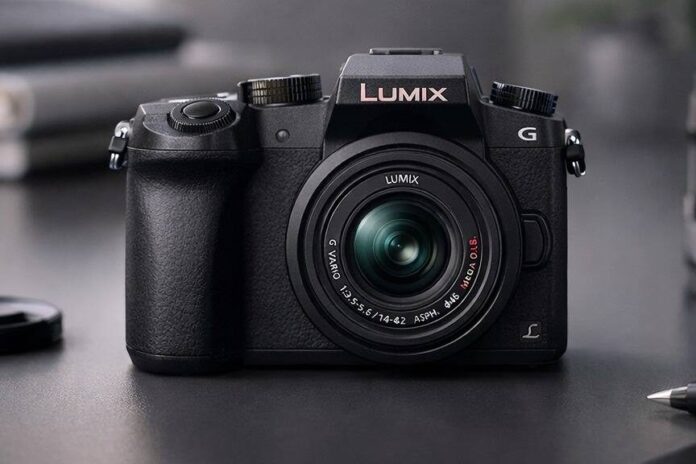
The G7 still handles better than many low-cost mirrorless cameras because it feels like a small DSLR rather than a flat little box with a lens mount. The grip is deep enough to hold confidently, the EVF is genuinely useful outdoors, and the dual control dials make exposure changes fast. For a beginner, that matters more than another spec-sheet bullet because a camera that makes aperture, shutter speed, and exposure compensation easy to reach gets used more seriously.
The fully articulating touchscreen is another reason the G7 stayed relevant for so long. It flips forward for self-recording, swings out for awkward angles, and makes touch focus easy. Panasonic’s menus from this era are not stylish, but they are sensible. The body starts and shoots quickly enough that normal stills use does not feel ancient. It is the automation and safety nets that feel old, not the basic operating speed.
Build quality is clearly consumer-grade. There is no weather sealing, no serious margin for abuse, and no reason to pretend this is a rough-use body. I would carry it for travel, family shooting, class work, or casual street photography without much concern. I would not choose it for dusty trails, heavy rain, or paid work where a body failure would cost real money.
Image quality from the 16MP sensor
In good light, the G7 still produces files that look better than many buyers expect from an older 16MP body. With a decent lens, daylight images are clean, sharp, and perfectly usable for web publishing, moderate prints, travel albums, student work, and family photography. Resolution is not the real limit here. Most buyers will hit lens quality, light, or technique limits before they truly hit a 16MP wall.
What dates the camera is not basic color or sharpness. It is the lower margin indoors and after dark. With the kit zoom, the files can get noisy and brittle faster than newer bodies do. The lack of in-body stabilization makes that worse because you either need better handholding, a stabilized lens, a faster prime, or a tripod sooner than you would on a G85 or newer body.
This is why lens choice matters so much here. Add a Panasonic 25mm f/1.7, Olympus 45mm f/1.8, or a stabilized zoom and the camera becomes much easier to like again. Leave it on a slow kit lens in mediocre light and the age shows quickly.
Autofocus and responsiveness
For stills, the G7 is fine as long as you stay honest about the subject. Single AF is quick in good light, touch focus is helpful, and face detection is good enough for portraits, travel scenes, food, products, and general family use. Basic camera operation also stays pleasant. The body reacts quickly enough that it never feels like a sluggish thrift-store compromise.
Where it falls behind is tracking. Panasonic’s Depth from Defocus system was smart for its time, but it is still a contrast-based approach. Kids running straight at the camera, erratic pets, sports, birds, and fast handheld video movement expose the gap immediately. Panasonic rated the G7 at up to 8 fps with focus locked and up to 6 fps with continuous AF, which is enough for short bursts but not enough to turn it into a serious action tool.
I would call the autofocus dependable for calm or moderately paced photography and clearly outdated for buyers who expect modern subject tracking confidence.
Video: where the G7 still works, and where it feels old
The G7 became popular because it gave budget buyers real UHD 4K before many rivals did, and that part of the story still holds. You get 4K up to 30p, manual exposure control, a flip screen, and a 3.5mm mic input. For talking-head setups, desk videos, product clips, class projects, and tripod-based YouTube work, that is still a useful package.
The trust-building part is being specific about the downsides. The 4K crop tightens framing. Continuous video AF can pulse or hunt. There is no IBIS to rescue handheld footage. Panasonic’s own manual also warns that in high ambient temperatures or long continuous movie capture, the camera may stop recording to protect itself. None of that kills the camera for planned video, but it absolutely matters for one-person run-and-gun use.
That is why I still like the G7 for deliberate video and dislike it for effortless video. Put it on a tripod, light the scene well, use manual focus when appropriate, and record through an external mic, and it can still produce respectable footage. Expect it to behave like a modern convenience-first creator camera and it disappoints fast.
Lenses and Micro Four Thirds value
The strongest long-term argument for the G7 is not the body. It is the mount. Micro Four Thirds still gives budget buyers one of the easiest ways to build a small, competent lens kit without spending wildly. If you want a deeper lens shortlist, our Micro Four Thirds lens guide is the natural next step.
If you buy the G7 with a basic kit zoom, I would treat that lens as a starting point, not the full story. The first upgrade I would make is the Panasonic 25mm f/1.7 because it is cheap, light, and immediately makes the camera feel more capable indoors. The Olympus 45mm f/1.8 is a great second lens for portraits. If video matters, I would prioritize a stabilized zoom because the body gives you no IBIS safety net.
This system flexibility is what keeps the G7 from being a dead-end purchase. Outgrow the body and the lenses can move to a G85, G9, GH-series body, or a newer OM System camera. That is much easier to recommend than a cheap camera tied to a weak or shrinking lens path.
Buying advice: when the G7 is smart, and when it is not
The G7 is smart when it is cheap, clean, and bought with the right expectations. In practical 2026 terms, that usually means a clean body around the high-$200s or low-$300 mark only if the condition is strong and the bundle is sensible. If the body price climbs much beyond that, you are usually shopping too close to cameras that fix the G7’s biggest weakness.
The obvious alternative is the G85. It gives you in-body stabilization, weather sealing, and a more forgiving overall shooting experience. If a G7 listing is only modestly cheaper than a usable G85, I would move up and compare it against our Panasonic Lumix camera guide instead of forcing the G7 to win on reputation.
I would also inspect any used G7 more carefully than a newer body. Check the screen hinge, battery door, card slot, hot shoe, mic jack, HDMI port, and charger. If a lens is included, test autofocus, stabilization, and zoom-ring feel. For video buyers especially, verify that 4K starts normally, the mic input works, and the articulating screen holds position properly.
What I would verify before buying one
If you only have a few minutes with a used G7, these are the checks that matter most:
- Screen and hinge: open and rotate the articulating screen through its full range and make sure it does not feel loose or gritty.
- Ports: test the mic input and HDMI output if video is part of the reason you are buying it.
- Stability: if a kit lens is included, half-press the shutter and make sure the lens stabilization engages cleanly without odd chatter.
- Card and 4K test: record a short 4K clip to a known-good SD card and confirm playback works immediately in-camera.
- Battery workflow: verify that the charger and battery are present and working, because this camera’s old external-charger setup is part of the ownership friction.
Final verdict
The Panasonic Lumix G7 is still worth buying, but only in a narrow and very practical lane. It is a cheap camera to learn with, a decent body for controlled 4K work, and a sensible entry into Micro Four Thirds if the price is right. It is not a stealth modern hybrid camera, and it is not the right answer for buyers who want strong autofocus confidence, stabilization, or hassle-free handheld shooting.
If I found a clean G7 at the right price, I would still recommend it to the buyer who wants to learn on a real camera rather than just collect specs. If the price creeps too close to a G85 or better-used Lumix body, I would skip it without hesitation.
Panasonic Lumix G7 alternatives
The main alternatives to the Panasonic Lumix G7 are Panasonic G85, Panasonic G95/G97, Panasonic G100, Sony ZV-E10, Canon M50, used Olympus/OM-D bodies. Compare autofocus, stabilization, video limits, lens choice and current price before deciding which camera fits you best.
Frequently asked questions
Is the Lumix G7 still worth buying?
Yes, but only when the price is clearly right. The G7 still makes sense as a low-cost learning camera and controlled-video body. It makes much less sense when used pricing gets too close to a G85 or another newer Lumix body.
What is a fair price for a Lumix G7 in 2026?
A clean body around the high-$200s to low-$300s can still make sense. Once the price moves much above that, you are usually too close to better-used alternatives such as the G85.
Is the Lumix G7 good for YouTube?
It can still be good for tripod-based YouTube work. The useful parts are 4K, the fully articulating screen, and the 3.5mm mic input. The weak points are contrast-detect video autofocus, no IBIS, and older overall convenience. If creator use is the main goal, also compare it with our best camera for YouTube picks.
Does the Lumix G7 have in-body stabilization?
No. The G7 body does not have IBIS. If handheld steadiness matters, use stabilized lenses, better technique, or move up to a Panasonic body that stabilizes the sensor.
Can you charge the Lumix G7 by USB?
Not in the modern in-camera sense most buyers mean. The G7 uses the older external-charger workflow, and that is one of the small but real convenience gaps versus newer cameras.
Does the Lumix G7 have Bluetooth?
No. Panasonic’s official documentation lists Wi-Fi connectivity, but not Bluetooth. That makes setup and file transfer feel more old-fashioned than on newer cameras with always-on wireless pairing.
What is the best first lens for the Lumix G7?
If you already have the kit zoom, add the Panasonic 25mm f/1.7 first. It is one of the cheapest upgrades that meaningfully improves indoor shooting, portraits, and subject separation. For portraits, the Olympus 45mm f/1.8 is an excellent next step.
Beginners, students, budget YouTube setups, travel learners, and small Micro Four Thirds kits.
You need IBIS, weather sealing, modern tracking AF, strong low light, USB charging, or easy handheld vlogging.
Low to medium; good controls for learning, but video AF and stabilization need care.
G85/G95/G97 for stabilization and better handling, GH-series for video, newer Micro Four Thirds bodies for stronger performance.
Good controlled 4K for the money, but weak continuous AF and no IBIS make run-and-gun work harder.
Yes only when priced as a budget learner; no if it is close to newer stabilized Lumix bodies.