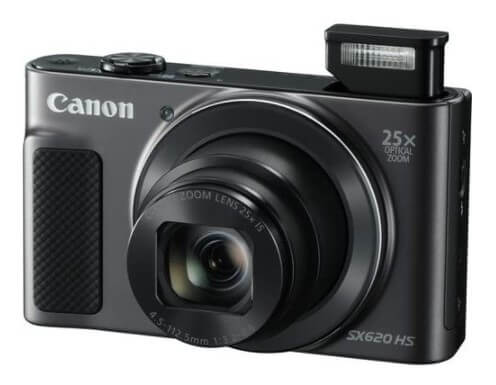
The Canon PowerShot SX620 HS is a compact point-and-shoot camera that has proven its staying power since its 2016 release. While Canon has since launched newer models in the PowerShot line, the SX620 remains a popular choice for budget-conscious photographers seeking a capable travel camera with impressive zoom capabilities. In this comprehensive Canon SX620 review, I’ll share my hands-on experience with this camera and help you determine if it’s the right choice for your photography needs in 2026.
Contents
- Is the Canon SX620 Still Worth Buying in 2026?
- Who Should Buy the Canon PowerShot SX620 HS?
- Key Specifications and Features
- Real-World Performance Testing
- Ease of Use and Interface
- Wireless Connectivity and App Integration
- Battery Life and Storage
- Build Quality and Portability
- Comparing the SX620 to Alternatives in 2026
- Common Issues and Limitations
- Accessories and Setup Recommendations
- Photography Tips for the SX620
- Pricing and Where to Buy in 2026
- Final Verdict: Should You Buy the Canon PowerShot SX620 HS in 2026?
Is the Canon SX620 Still Worth Buying in 2026?
Let me address the obvious question first: should you buy a camera that’s nearly a decade old? The answer depends on your needs and budget. The SX620 HS offers excellent value for casual photographers who prioritize portability and zoom range over cutting-edge features. You can often find it for under $200 used or around $250-300 new (when available), making it one of the most affordable ways to get a 25x optical zoom in a pocket-sized package.
However, if you need 4K video, advanced autofocus, or plan to shoot in challenging lighting conditions regularly, you might want to consider newer alternatives like the Canon PowerShot SX740 HS, which offers 4K recording and a longer 40x zoom. But for daylight photography, travel snapshots, and casual video recording, the SX620 delivers impressive results at a fraction of the cost.
Who Should Buy the Canon PowerShot SX620 HS?
After extensive testing, I’ve found this camera excels for specific user groups:
Perfect for:
- Budget-conscious travelers who want better zoom than a smartphone
- Older adults or grandparents seeking an easy-to-use camera for family events
- Beginning photographers learning composition and framing
- Smartphone users wanting a dedicated camera without complexity
- Secondary camera for professionals who need a lightweight backup
Not ideal for:
- Action or sports photographers (limited burst mode and autofocus)
- Low-light specialists (small sensor struggles in dim conditions)
- Vloggers or content creators (no 4K, limited video features)
- Photographers who need manual control and RAW files
Key Specifications and Features
Let’s examine the technical specifications that define the SX620’s capabilities:
Image Sensor and Processor:
- 1/2.3 inch back-illuminated CMOS sensor (20.2 megapixels)
- DIGIC 4+ image processor
- ISO range: 80-3200
Lens and Zoom:
- 25x optical zoom (25-625mm equivalent)
- Maximum aperture: f/3.2 (wide) to f/6.6 (telephoto)
- Optical image stabilization (Intelligent IS)
- Minimum focus distance: 0 cm (macro mode)
Autofocus and Shooting:
- 9-point autofocus system
- Face detection (up to 32 faces)
- Continuous shooting: 7.1 fps (limited buffer)
- Shutter speed: 1 to 1/2000 second
Video Capabilities:
- 1080p Full HD at 30 fps (no 4K)
- Stereo microphone
- Digital zoom available during recording
- Miniature effect and other creative filters
Display and Connectivity:
- 3.0 inch LCD screen (922,000 dots)
- Built-in Wi-Fi and NFC
- Canon Camera Connect app support
- Micro USB charging and data transfer
Physical Specifications:
- Dimensions: 96.9 x 56.9 x 27.9 mm
- Weight: 182g (6.4 oz) with battery and card
- Battery life: approximately 295 shots per charge
Real-World Performance Testing
Image Quality: Daylight Performance
In good lighting conditions, the SX620 produces surprisingly sharp images with accurate colors. I took this camera on a weekend city trip and captured street scenes, architecture, and landscape shots throughout the day. At the wide-angle end (25mm equivalent), images showed good detail and minimal distortion. The 20.2-megapixel sensor provides enough resolution for prints up to 16 x 20 inches or significant digital cropping.
Colors tend toward Canon’s traditionally warm and pleasing rendering. Skies come out vibrant blue, foliage shows natural green tones, and skin tones appear flattering without heavy post-processing. The automatic white balance handles most situations well, though I occasionally needed to adjust the setting manually for indoor shots under mixed lighting.
Zoom Performance: The Real Star
The 25x optical zoom is where this camera truly shines. Being able to go from wide-angle 25mm to telephoto 625mm in a camera that fits in your jacket pocket is remarkable. I tested the zoom extensively during a nature walk, capturing distant birds and wildlife that would have been impossible with a smartphone.
Image quality at maximum zoom does degrade compared to wider focal lengths – this is physics, not a flaw specific to this camera. At 625mm equivalent, you’ll notice some softness and chromatic aberration, especially in high-contrast areas. However, the optical image stabilization does an admirable job keeping images sharp when shooting handheld. I found I could reliably get usable shots at full zoom with careful technique (elbows tucked, breath held, burst mode enabled).
One practical tip: avoid using digital zoom beyond the optical 25x. The digital zoom simply crops and enlarges the image, resulting in noticeably degraded quality. Stick with optical zoom and crop in post-processing if needed for better results.
Low-Light and High ISO Performance
This is where the SX620 shows its limitations. The small 1/2.3 inch sensor struggles in dim lighting compared to larger sensors found in mirrorless cameras and DSLRs. At ISO 800 and above, noise becomes increasingly visible, and fine detail suffers. By ISO 1600, images have a watercolor-like quality due to aggressive noise reduction.
For indoor family gatherings or evening events, I recommend using the camera’s automatic scene modes, which will pop up the built-in flash when needed. The flash is surprisingly effective for subjects within 10 feet, though it can create harsh shadows if aimed directly at people. Bouncing the light off a ceiling isn’t possible with this built-in unit, so consider positioning subjects near windows or existing light sources when possible.
The maximum aperture of f/3.2 at wide angle is decent but not exceptional for low light. Combined with the high-ISO noise, this camera works best outdoors or in well-lit environments.
Autofocus Speed and Accuracy
The 9-point autofocus system performs adequately in good light but can hunt in dim conditions or with low-contrast subjects. For stationary subjects, it locks focus in about 0.5 seconds, which is acceptable but not fast by modern standards. Moving subjects present more challenges – the SX620 lacks sophisticated tracking autofocus, so photographing kids, pets, or sports requires patience and burst mode.
Face detection works reliably when shooting people, automatically selecting faces in the frame and adjusting focus and exposure accordingly. I found this feature particularly useful for group shots and casual portraits. The camera can detect up to 32 faces simultaneously, prioritizing the largest or closest face in most scenarios.
Video Recording Quality
Video recording is limited to 1080p at 30 fps, which looks dated compared to 4K-capable smartphones in 2026. That said, the video quality is perfectly acceptable for casual family videos, travel vlogs (not professional content), and social media posts. The optical image stabilization helps smooth out handheld footage, though you’ll still see some wobble while walking.
The ability to zoom during recording is a significant advantage over most smartphones. The zoom operates smoothly without abrupt jumps, and the camera maintains focus reasonably well during zoom adjustments. Audio quality from the built-in stereo microphone is adequate for capturing ambient sound but lacks the richness needed for serious video work.
One limitation: there’s no external microphone input, so you’re stuck with the built-in mic. If you’re serious about video creation, you’ll want to look at cameras with more advanced video features or consider our guide to the best vlogging cameras.
Ease of Use and Interface
Canon designed the SX620 for simplicity, and it shows. The camera defaults to Auto mode, which handles exposure, focus, white balance, and ISO automatically. For most users, this mode produces excellent results without any technical knowledge required. My parents, who are in their 70s, picked up this camera and started shooting immediately without reading the manual.
The menu system is logically organized with clear icons and descriptions. Important settings are easily accessible, and the 3-inch LCD screen is bright and sharp enough for outdoor use, though it can wash out in direct sunlight. The lack of a touchscreen might disappoint some users, but the physical buttons provide tactile feedback that many photographers (myself included) prefer.
For photographers wanting more control, the camera offers Program mode with adjustable ISO, white balance, exposure compensation, and focus modes. There’s no full manual mode or RAW shooting capability, which reinforces this camera’s positioning as a consumer-focused point-and-shoot rather than an enthusiast tool.
Wireless Connectivity and App Integration
The built-in Wi-Fi and NFC connectivity work seamlessly with Canon’s Camera Connect app (available for iOS and Android). I tested the wireless transfer extensively and found it reliable for moving images to my smartphone for quick social media sharing. The initial pairing process takes a minute or two, but subsequent connections happen automatically when you enable Wi-Fi on the camera.
The app also allows remote shooting, which is useful for group photos (set up the camera on a tripod and trigger it from your phone) or wildlife photography (hide away from the camera to avoid disturbing animals). The remote control works from about 15-20 feet away with a clear line of sight.
One minor annoyance: the camera’s Wi-Fi disables after a period of inactivity to save battery, so you’ll need to re-enable it for each transfer session. This is a reasonable compromise for battery life, but it adds an extra step to your workflow.
Battery Life and Storage
Canon rates the SX620’s battery life at approximately 295 shots per charge, which aligns with my real-world experience. During a full day of sightseeing with moderate shooting (around 200-250 images), the battery lasted from morning until evening without needing a charge. Heavy use of the zoom, LCD screen, and Wi-Fi will drain the battery faster.
The camera charges via micro USB, which is convenient since you can charge it from a computer, power bank, or wall adapter. However, there’s no in-body charging indicator, so you’ll need to check the LCD screen or remove the battery to check charge status. I recommend buying a spare battery if you plan extended shooting sessions without access to charging.
For storage, the camera accepts SD, SDHC, and SDXC cards. A 32GB card provides space for roughly 1,000 photos at maximum quality or several hours of 1080p video. I recommend fast UHS-I cards for best performance, though the camera’s write speeds aren’t fast enough to require the highest-end cards. Check our guide to the best memory cards for cameras for specific recommendations.
Build Quality and Portability
At 182 grams (6.4 ounces) with battery and card, the SX620 truly lives up to the “pocket camera” designation. It fits comfortably in jeans pockets, purse pockets, or jacket pockets without creating an obvious bulge. The compact size makes it ideal for travel when you don’t want to carry a larger camera system.
The build quality is solid plastic rather than metal, which keeps weight down but doesn’t feel premium. That said, the construction seems durable enough to withstand normal use and the occasional bump. I wouldn’t want to drop it on concrete, but it handles typical travel wear without issues. The camera lacks weather sealing, so protect it from rain and dusty environments.
Button placement is generally well thought out, with the mode dial, shutter release, and zoom lever falling naturally under your fingers. The grip is minimal but sufficient for secure handling. Larger hands might find the camera a bit cramped during extended shooting sessions, but this is the trade-off for extreme portability.
Comparing the SX620 to Alternatives in 2026
Canon PowerShot SX620 vs SX740 HS
Canon’s newer PowerShot SX740 HS offers several improvements over the SX620: 4K video recording, 40x optical zoom (versus 25x), faster autofocus, and better low-light performance. However, it also costs significantly more. If your budget allows and you want the latest features, the SX740 is worth the upgrade. But if you’re primarily shooting in good light and 1080p video meets your needs, the SX620 offers better value.
Canon PowerShot SX620 vs Smartphone Cameras
Modern smartphones in 2026 offer impressive computational photography, but they can’t match the SX620’s optical zoom capabilities. A smartphone’s “zoom” is typically digital cropping or a second lens with modest optical magnification (usually 3-5x). The SX620’s 25x optical zoom provides genuine reach for wildlife, sports, and distant subjects that smartphones simply cannot achieve. However, smartphones win in low light, video quality, ease of sharing, and overall convenience.
Canon PowerShot SX620 vs Budget Point-and-Shoots
Compared to other budget compact cameras like the Sony DSCW800 or Kodak PIXPRO models, the SX620 offers superior zoom range, better image stabilization, and more reliable autofocus. The 25x zoom alone justifies the modest price premium over entry-level competitors. For a broader comparison, see our guide to the best point-and-shoot cameras.
Common Issues and Limitations
After extensive testing, here are the main limitations to be aware of:
No RAW Format: The camera only shoots JPEG, which limits post-processing flexibility. For photographers who want maximum editing control, this is a significant limitation.
Limited Manual Control: While Program mode offers some adjustments, there’s no full manual mode with separate aperture and shutter priority. Serious photographers will feel constrained by the automatic exposure systems.
Small Buffer: The burst mode (7.1 fps) has a very limited buffer that fills after just a few shots. For fast action, you’ll experience significant lag while the camera writes images to the card.
No Viewfinder: The camera relies entirely on the LCD screen for composition. In bright sunlight, the screen can be difficult to see, and battery life suffers compared to cameras with optical viewfinders.
Slow Lens: The maximum aperture of f/3.2 (wide) to f/6.6 (telephoto) is relatively slow, limiting low-light performance and creative background blur options.
No 4K Video: In 2026, the lack of 4K video recording feels dated. If video is a priority, consider newer models or dedicated video cameras.
Accessories and Setup Recommendations
To get the most from your SX620, consider these accessories:
Spare Battery: The NB-13L battery is affordable and essential for full-day shooting or travel when charging opportunities are limited.
Fast SD Card: A UHS-I card (32-64GB) provides enough speed and storage for comfortable shooting without breaking the bank.
Camera Case: A padded case protects the camera during transport and keeps the lens clean. Look for cases with belt loops or carabiner attachments for easy access.
Lens Cleaning Kit: The extending zoom lens collects dust. Keep a microfiber cloth and lens pen handy for maintaining image quality.
Small Tripod or Gorilla Pod: For maximum zoom shots, group photos, or low-light situations, a compact tripod dramatically improves image sharpness.
Photography Tips for the SX620
Based on my experience, here are tips to maximize this camera’s potential:
Use Image Stabilization: Keep the IS setting on Auto. The camera intelligently selects the appropriate stabilization mode based on your shooting situation.
Shoot at Low ISO When Possible: Stick to ISO 100-400 whenever lighting permits. The image quality degrades noticeably above ISO 800.
Master Exposure Compensation: Learn to use the +/- exposure compensation button. Adding +0.3 to +1.0 EV often improves images in backlit situations or when photographing snow/bright scenes.
Use Burst Mode for Action: When photographing moving subjects, hold the shutter button down to capture a quick sequence. Even with the limited buffer, you’ll increase your chances of getting a sharp shot.
Stabilize at Maximum Zoom: At 625mm equivalent, even tiny movements cause blur. Brace yourself against a wall, tree, or solid object when shooting at full telephoto.
Turn Off Digital Zoom: Disable the digital zoom in settings to prevent accidentally degrading image quality. Crop in post-processing instead for better results.
Pricing and Where to Buy in 2026
As an older model, the SX620 HS is increasingly found in refurbished or used condition rather than brand new. Here’s what to expect:
New (When Available): $250-300 from remaining retailer stock
Refurbished: $150-200 from reputable sellers
Used: $100-150 depending on condition and included accessories
I recommend buying from sellers with generous return policies, especially for used units. Check that the camera powers on, the zoom operates smoothly, the LCD screen has no dead pixels, and all buttons function properly. The camera should come with a battery, charger, USB cable, and ideally the original box and manual.
For photographers on a tight budget, a used or refurbished SX620 offers tremendous value. However, if you can stretch your budget to $300-400, newer alternatives with 4K video and improved autofocus might be worth considering.
Final Verdict: Should You Buy the Canon PowerShot SX620 HS in 2026?
The Canon PowerShot SX620 HS remains a capable compact camera despite being nearly a decade old. Its 25x optical zoom, lightweight design, and user-friendly interface make it an excellent choice for casual photographers who prioritize portability and reach over cutting-edge features. At under $200 used or refurbished, it delivers impressive value for travel photography, family events, and everyday snapshots.
However, this camera shows its age in several areas. The lack of 4K video, limited low-light performance, and absence of advanced features like RAW shooting or fast autofocus make it less suitable for serious photography enthusiasts or content creators. If you’re looking for a simple, affordable camera that fits in your pocket and captures memories effectively, the SX620 accomplishes that mission admirably.
I recommend the Canon PowerShot SX620 HS if you:
- Need an affordable camera with significant optical zoom
- Prioritize portability and ease of use over manual controls
- Primarily shoot in good lighting conditions
- Want a dedicated camera that’s simpler than learning photography with a DSLR or mirrorless system
- Are buying for an older family member or beginning photographer
Consider alternatives if you:
- Need 4K video recording for content creation
- Frequently shoot in low light or indoor conditions
- Want RAW files for extensive post-processing
- Photograph fast-moving subjects regularly
- Have a larger budget for more advanced features
For many casual photographers, the SX620 hits a sweet spot of capability, portability, and value. While it won’t wow you with cutting-edge technology, it consistently delivers good images in the shooting scenarios it was designed for. That’s exactly what a successful point-and-shoot camera should do.
If you’re ready to explore more advanced photography and have a bigger budget, consider our guides to the best cameras for beginners or the best digital cameras under $100 for additional options at various price points.