Why Your YouTube Camera Choice Matters in 2026
After helping dozens of creators start and grow their YouTube channels over the past five years, I can tell you this: your camera matters, but not in the way most beginners think. You do not need a $5,000 cinema camera to get monetized or build an audience. You need a camera that matches your specific YouTube content style, eliminates technical frustrations, and lets you focus on creating rather than troubleshooting.
The YouTube landscape has evolved dramatically. Algorithm changes favor consistency over perfection. Viewers watch on phones where 4K barely matters. And the most successful creators prioritize storytelling and personality over technical specs. Yet having the right camera for your specific content type – talking head videos, product reviews, cinematic B-roll, gaming streams, or tutorials – makes the creation process dramatically easier.
This guide covers the best cameras for YouTube in 2026, organized by content type and budget. Every camera has been tested extensively for real-world YouTube production, and I will share what actually matters for building a successful channel.
What Makes a Great YouTube Camera in 2026
Long Recording Support
YouTube videos run long – 10 minutes, 20 minutes, even hours for podcasts and streams. Cameras that stop recording after 29 minutes are frustrating for YouTube. Look for long-recording support, good heat management, or at minimum 4K recording beyond 30 minutes for talking-head videos, podcasts, and streams.
Good Autofocus (For Solo Creators)
If you shoot alone, reliable autofocus with face/eye detection is essential. You cannot check focus between takes when you are also the subject. Modern mirrorless cameras from Sony, Canon, and Nikon offer AI-powered autofocus that just works.
Clean HDMI Output (For Streamers)
Gaming streamers and live content creators need clean HDMI output to use cameras as webcams. This provides dramatically better quality than built-in laptop cameras for streaming, video calls, and live YouTube broadcasts.
Good Low-Light Performance
Not everyone has a dedicated studio with controlled lighting. Cameras with larger sensors (APS-C or full-frame) and good high-ISO performance handle indoor shooting, window light, and less-than-perfect conditions without grainy footage.
Microphone Input
Built-in camera mics sound terrible. A 3.5mm microphone input is non-negotiable for quality YouTube audio. Bonus points for headphone jacks to monitor audio while recording.
Articulating or Flip Screen (For Solo Recording)
Solo YouTube creators need to see themselves while recording. Fully articulating screens that flip to the side are ideal. Fixed screens are fine only if someone else operates the camera.
Best Cameras for YouTube by Content Type
For Talking Head Videos & Educational Content
Best Overall: Sony ZV-E10 II
Price: about $1,000 body-only, often less with discounts
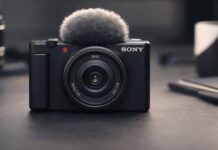
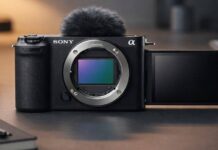
The Sony ZV-E10 II is the cleaner current YouTube pick for creators who want an interchangeable-lens Sony body without jumping to the a6700. It brings a 26MP APS-C sensor, 4K up to 60p, 10-bit recording, a fully articulating screen, product showcase mode, background defocus, a larger NP-FZ100 battery, and reliable real-time autofocus.
Sony’s autofocus remains one of the safest choices for solo creators. It locks onto faces and products confidently, which matters more for YouTube than chasing headline resolution.
I recommend the ZV-E10 II for YouTube channels focused on education, commentary, reviews, or any content where you are talking to camera. Read the full Sony ZV-E10 II review before choosing it over a compact creator camera.
What I love: Strong autofocus, 4K60, 10-bit recording, better battery life than the original ZV-E10, product showcase mode, and access to Sony’s E-mount lens ecosystem.
What to know: No in-body stabilization, no viewfinder, 4K60 uses a slight crop, and the kit lens is only okay. Use a stabilized lens, tripod, grip, or compact gimbal for movement.
Best for: Educational content, product reviews, talking head videos, tech channels, commentary, tutorial creators, solo YouTubers.
Also see: Complete vlogging camera comparison for more creator-focused options.
Best Budget: Canon EOS R50
Price: usually under $800 with a kit lens
The Canon EOS R50 is the better 2026 Canon budget recommendation than the old M50 Mark II because it uses the current RF/RF-S mount and records uncropped 4K up to 30 fps oversampled from 6K. It also gives beginners Canon color, a flip screen, Dual Pixel CMOS AF II, and a simple body that feels approachable.
The user interface is more beginner-friendly than Sony, and the camera feels intuitive for first-time YouTube creators who do not want to learn a complex menu system immediately.
What I love: Canon colors, reliable autofocus, flip screen, current lens mount, beginner-friendly controls, and strong 4K30 quality for the price. Read the full Canon R50 review before buying.
What to know: It does not shoot 4K60, battery life is modest, and there is no headphone jack for audio monitoring. If video is the whole job, compare it with the more creator-focused R50 V or Sony ZV-E10 II.
Best for: Budget creators, beginners, anyone wanting Canon color science, YouTubers prioritizing ease of use.
Premium Option: Canon EOS R6 Mark II
Price: $2,500 body
For professional YouTube channels or creators wanting ultimate reliability, the Canon R6 Mark II delivers professional features: exceptional autofocus, unlimited 4K 60fps recording, in-body stabilization, weather sealing, and outstanding low-light performance.
This camera simply works. The autofocus never fails. The stabilization compensates for handheld shake. And the image quality competes with anything under $5,000.
Best for: Professional YouTubers, full-time creators, channels generating income, anyone wanting zero technical frustrations.
For Product Reviews & Unboxing Channels
Best Choice: Sony ZV-E10 II with Product Showcase Mode
Price: about $1,000 body-only
The ZV-E10 II’s product showcase mode is genuinely useful for reviewers. Normally, holding products in front of camera can cause autofocus to hunt. Product showcase mode shifts focus from your face to whatever you hold up, which is exactly what unboxing videos and product demonstrations need.
Pair it with a compact wide E-mount lens or stabilized kit zoom for a flattering perspective that captures both you and products on the desk.
Also consider: Essential gear for product reviewers including lighting and audio.
Alternative: Nikon Z30
Price: $710 body, $850 with kit lens
The Nikon Z30 offers similar creator-friendly handling with simpler menus and better ergonomics. It lacks Sony’s product showcase mode, but its autofocus and long recording times make it capable for product content.
For Cinematic YouTube & Filmmaking
Best for Cinematic Quality: Sony A6700
Price: $1,400 body
For YouTube channels emphasizing cinematic quality – travel films, documentaries, narrative content – the Sony A6700 delivers professional video features: oversampled 4K, 10-bit 4:2:2 color, S-Log profiles, exceptional autofocus, and in-body stabilization.
The image quality is stunning. Colors grade beautifully. And the autofocus reliability means you nail focus even during complex shots.
What I love: Professional video specs. Incredible autofocus. Excellent low-light performance (usable ISO 12,800). In-body stabilization. 10-bit color for advanced grading. Weather sealing.
What to know: Expensive. Complex for beginners. Requires color grading for best results. Overkill for simple talking head content.
Best for: Cinematic YouTube channels, travel content, documentary-style videos, narrative content, professional productions.
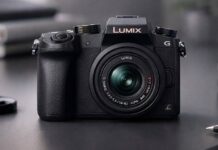
Budget Cinematic: Panasonic Lumix G7
Price: $500 used (discontinued but widely available)
The Panasonic G7 from 2015 remains surprisingly capable for cinematic YouTube content. 4K video quality holds up, Micro Four Thirds lenses are affordable, and the fully articulating screen helps with creative angles.
Autofocus is slower than modern cameras, but for planned shots on tripod, the G7 delivers excellent image quality at bargain prices.
Best for: Budget filmmakers, planned/scripted content shot on tripod, creators learning cinematography, anyone wanting 4K on tight budget.
For Gaming Streams & Live Content
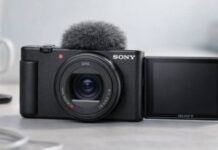
Best Streaming Camera: Sony ZV-1 or ZV-E10
Price: $750-800
Gaming streamers need cameras that function as high-quality webcams via clean HDMI output. Both Sony ZV-1 and ZV-E10 excel here: excellent autofocus keeps you in focus during animated reactions, good low-light performance handles dim gaming setups, and clean HDMI output integrates perfectly with OBS and streaming software.
The ZV-E10 offers interchangeable lenses (use wide-angle for full upper body shots). The ZV-1 is more compact with fixed lens but includes built-in ND filter.
Setup: Camera → HDMI capture card → Computer → OBS/Streamlabs. The image quality dramatically outperforms webcams, giving your stream professional polish.
What I love: Clean HDMI output. Excellent autofocus for active streamers. Good low-light performance. Background defocus separates you from cluttered gaming rooms.
What to know: Requires HDMI capture card ($100-150 additional). More complex setup than webcam. Powered via AC adapter (not USB).
Best for: Gaming streamers, live content creators, podcast video, anyone prioritizing camera-as-webcam quality.
Alternative: Elgato Facecam Pro
Price: $300
If HDMI camera setup seems complex, the Elgato Facecam Pro delivers webcam simplicity with much better quality than standard webcams. 4K sensor, excellent low-light, USB connection. Not camera-quality but dramatically better than laptop webcams.
For Vlogging & On-the-Go Content
Best Portable: DJI Osmo Pocket 3
Price: $520
The DJI Osmo Pocket 3 is perfect for YouTube creators who shoot on location – travel channels, day-in-the-life content, outdoor adventures. This tiny gimbal camera fits in your pocket but shoots stabilized 4K 120fps with professional-looking results.
The 3-axis motorized gimbal eliminates shaky footage completely. Face tracking keeps you centered automatically. And the compact form factor means you actually bring it with you rather than leaving bulky gear at home.
What I love: Unbeatable portability. Buttery smooth stabilization. Good image quality from 1-inch sensor. Native vertical mode for YouTube Shorts. Fast workflow – shoot and upload immediately.
What to know: Limited low-light compared to larger sensors. No interchangeable lenses. Fixed focal length. Battery life is 2-3 hours continuous recording.
Best for: Travel YouTubers, vloggers, on-the-go creators, anyone prioritizing portability, YouTube Shorts creators.
Also see: Best vlogging cameras compared for all portable options.
For Budget YouTube Creators
Best Value: Your Smartphone
Price: $0 (you already own it)
Let me be honest: if you have iPhone 13+, Galaxy S21+, or Pixel 6+, you own a 4K camera capable of creating successful YouTube content. Modern smartphones have computational photography, image stabilization, and quality that rivals dedicated cameras for well-lit scenes.
Thousands of successful YouTube channels shot early content entirely on phones. The camera never limits you – content quality, consistency, and personality do.
When phones work perfectly:
– Talking head videos with good lighting
– Tutorial content at desk
– Product unboxing with overhead shots
– B-roll and supplemental footage
– YouTube Shorts (vertical native)
When to upgrade to dedicated camera:
– Low-light shooting (indoor evening content)
– Zoom capability for distant subjects
– Background blur control (shallow depth of field)
– Professional client work requiring perceived quality
– 60+ minute recordings (phones overheat)
Start with your phone. Invest in good lighting and audio first. Upgrade camera only when phone consistently limits your creative vision.
Best Budget Dedicated Camera: Used Canon M50
Price: $400-500 used
The original Canon M50 (2018) remains an excellent budget YouTube camera in 2026. Available used for $400-500, it delivers flip screen, Dual Pixel autofocus, 4K video, and Canon colors. Perfect entry-level dedicated camera.
YouTube Camera Recommendations by Budget
Under $500: Smartphone + Accessories
Total: $150-300
– Camera: Your current smartphone – $0
– Tripod: Phone tripod ($20)
– Light: Neewer ring light ($50)
– Mic: Boya BY-M1 lavalier ($20)
– Backdrop: Wrinkle-free fabric or poster board ($30)
This setup produces professional-looking YouTube content. Lighting and audio matter more than camera specs at this budget.
$800-1,000: Best Value Setup
– Camera: Sony ZV-E10 with kit lens – $800
– Light: Neewer LED panel – $80
– Mic: Rode VideoMicro – $80
– Memory: SanDisk Extreme Pro 128GB – $35
– Tripod: Manfrotto Compact Action – $70
– Total: ~$1,065
This setup handles 90% of YouTube content types professionally. The ZV-E10 is purpose-built for creators. Add lighting and audio for complete production capability.
$2,000: Professional Creator Setup
– Camera: Sony A6700 body – $1,400
– Lens: Sigma 16mm f/1.4 – $400
– Light: Elgato Key Light – $180
– Mic: Rode Wireless GO II – $300
– Accessories: Tripod, SD cards, batteries – $200
– Total: ~$2,480
Professional-quality setup for full-time creators or channels generating income. Every aspect produces client-ready results.
Essential Accessories for YouTube Creators
Lighting: More Important Than Camera
Good lighting transforms cheap cameras. Bad lighting ruins expensive cameras. Invest in lighting before upgrading camera body.
Budget ($50-100): Neewer ring light or LED panel
Better ($180-200): Elgato Key Light – adjustable color temp and brightness
Best ($400+): 3-point lighting setup with softboxes
Position key light 45 degrees from camera, slightly above eye level. Add fill light opposite side to soften shadows.
Audio: Your Second Priority
Audio quality matters more than video quality. Viewers tolerate mediocre video but immediately leave on poor audio.
Budget ($20-50): Boya BY-M1 lavalier mic
Better ($80): Rode VideoMicro shotgun mic
Best ($300): Rode Wireless GO II wireless lav system
Position mic close to mouth (6-12 inches). Closer means clearer audio and less room echo.
Memory Cards: Do Not Cheap Out
4K video files are massive. Buy quality cards with sufficient capacity and speed.
Minimum: 128GB UHS-I (V30 rating)
Recommended: 128GB UHS-II (V60 rating)
Buy: SanDisk Extreme Pro or ProGrade Digital
See our complete memory card guide for recommendations.
Tripod: Stability Matters
Handheld footage for talking head videos looks amateurish. Invest in stable tripod.
Budget ($30): AmazonBasics 60-inch
Better ($70): Manfrotto Compact Action
Best ($150+): Manfrotto BeFree Advanced or fluid head tripod
Ensure tripod extends to comfortable eye level and supports your camera weight.
Camera Settings for YouTube
Resolution: 1080p or 4K?
Shoot 4K if:
– Your camera handles 4K without overheating
– You have computer power to edit 4K smoothly
– You want to crop/reframe in post
– Future-proofing matters to you
Shoot 1080p if:
– Your camera overheats in 4K
– Your computer struggles with 4K editing
– You upload daily and need fast workflow
– Most viewers watch on phones anyway (1080p looks great)
Honestly, 1080p at 60fps looks better than stuttery 4K at 24fps. Prioritize smooth performance over resolution specs.
Frame Rate: 24fps, 30fps, or 60fps?
24fps: Cinematic feel, film-like motion blur. Best for narrative content, travel films, artistic videos.
30fps: Standard YouTube frame rate. Natural motion, efficient file sizes. Best for most talking head content, tutorials, reviews.
60fps: Smooth motion, great for gaming footage, action content, or slow-motion capability. Larger file sizes.
I recommend 30fps for most YouTube content. It looks natural, edits smoothly, and uploads quickly.
Aperture: Blurry Background or Sharp Everything?
Wide aperture (f/1.8-f/2.8): Blurred background separates you from environment. Flattering for talking head videos. Requires consistent subject distance (stay in focus zone).
Narrow aperture (f/5.6-f/8): Everything sharp from near to far. Better for product demos where you move items closer/farther. Easier to maintain focus.
For talking head content, f/2.8-f/4 provides nice background separation while maintaining reasonable focus tolerance.
Common YouTube Camera Mistakes
Mistake 1: Buying Too Much Camera
Beginners often buy expensive cameras they do not know how to use. A $3,000 camera does not automatically create better content than a $700 camera. Start modest, learn fundamentals, upgrade when current gear limits you.
Mistake 2: Ignoring Lighting and Audio
A $500 camera with good lighting and audio produces better YouTube videos than a $3,000 camera in dim rooms with terrible audio. Invest in lighting and microphones before camera upgrades.
Mistake 3: Chasing Specs Instead of Creating
Pixel-peeping specs and reading reviews wastes time you could spend creating content. Choose adequate camera, then create consistently. Your first 50 videos will not be perfect regardless of camera – make them anyway.
Mistake 4: Not Testing Before Big Purchases
Rent cameras before buying. Many creators discover they prefer different ergonomics, menus, or features after hands-on testing. Spending $50 to rent prevents $1,000 buyer’s remorse.
Mistake 5: Forgetting Computer Requirements
4K video requires powerful computers for smooth editing. Ensure your computer handles your camera’s file formats before buying. Upgrading computer often matters more than upgrading camera.
Do You Really Need a Camera for YouTube?
Let me be controversial: most beginners do not need to buy cameras. Your smartphone produces quality exceeding 99% of viewers’ standards. What separates successful channels from failures is not camera specs – it is consistency, personality, storytelling, and audience understanding.
Start with your phone if:
– You have not published 10 videos yet
– Budget is limited (under $500 total)
– You are testing content ideas and niches
– Lighting in your recording space is good
– You shoot content under 30 minutes
Buy dedicated camera when:
– You publish consistently (weekly minimum)
– Phone limitations frustrate you regularly
– You shoot in low-light frequently
– You need specific features (clean HDMI, long recording, interchangeable lenses)
– Your channel generates income that justifies investment
The best camera is the one you actually use consistently. A phone you use daily beats a DSLR that intimidates you into inaction.
Camera Recommendations by YouTube Niche
Tech Reviews: Sony ZV-E10 II (product showcase mode)
Gaming: Sony ZV-E10 II or ZV-1 II (clean HDMI output)
Beauty/Fashion: Canon EOS R50 (beautiful skin tones)
Education/Tutorials: Sony ZV-E10 II or Nikon Z30
Travel: DJI Osmo Pocket 3 (portability)
Cooking: Sony ZV-E10 II (overhead angles, product showcase)
Fitness: DJI Osmo Pocket 3 or GoPro Hero 13 Black
Commentary/Reaction: Canon EOS R50 (simple, current RF mount)
Cinematic: Sony A6700 or Panasonic S5
Budget Everything: Smartphone + good lighting
Future-Proofing Your Camera Investment
Camera bodies become outdated quickly. Lenses last decades. If buying interchangeable lens camera, invest in quality glass that you will use long after upgrading camera body.
Safe lens investments:
– Quality wide-angle for YouTube (16mm or 10-18mm for APS-C)
– Fast prime (35mm f/1.8 or 50mm f/1.8)
– Standard zoom (24-70mm equivalent)
Buy adequate camera body, excellent lenses. Upgrade body in 3-5 years. Keep lenses forever.
Conclusion: Choose Your Tool and Start Creating
The best YouTube camera in 2026 is the one that fits your content style, matches your budget, and inspires you to create consistently. Whether that is your current smartphone, a Sony ZV-E10 II kit, or a $2,500 professional setup, the camera matters far less than what you do with it.
My recommendations:
– Best overall for YouTube: Sony ZV-E10 II (often around $900-1,100 as a kit)
– Best budget: Canon EOS R50 (usually under $800 with kit lens) or your smartphone ($0)
– Best for streaming: Sony ZV-E10 II or ZV-1 II, depending on whether you want interchangeable lenses
– Best portable: DJI Osmo Pocket 3 ($520)
– Best professional: Sony A6700 ($1,400)
Stop researching. Choose adequate camera. Start creating. Your first 50 videos will teach you more than any camera review ever could.
Explore beginner cameras, get the essential gear, and build your YouTube channel with tools that work.
The audience is waiting. Go create something that matters.