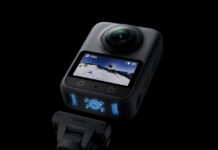

The DJI Osmo Pocket 3 is still worth buying in 2026, especially in the US. It is no longer DJI’s newest pocket gimbal camera, but it combines a 1-inch sensor, reliable autofocus, three-axis mechanical stabilization, and direct wireless-microphone support in a genuinely small package. More importantly for American buyers, it remains easier to buy with familiar retailer support than the newer Pocket 4 and Pocket 4P.
The Pocket 3 is best for travel videos, walk-and-talk vlogs, family footage, interviews, and discreet behind-the-scenes work. Do not buy it for rain, underwater use, impact-heavy sports, or still photography. It is not waterproof, the gimbal needs protection, and its approximately 9.4MP photos are secondary to its video capabilities.
\n
That broad creator appeal put the Pocket 3 at number one in our August US camera search-interest ranking.
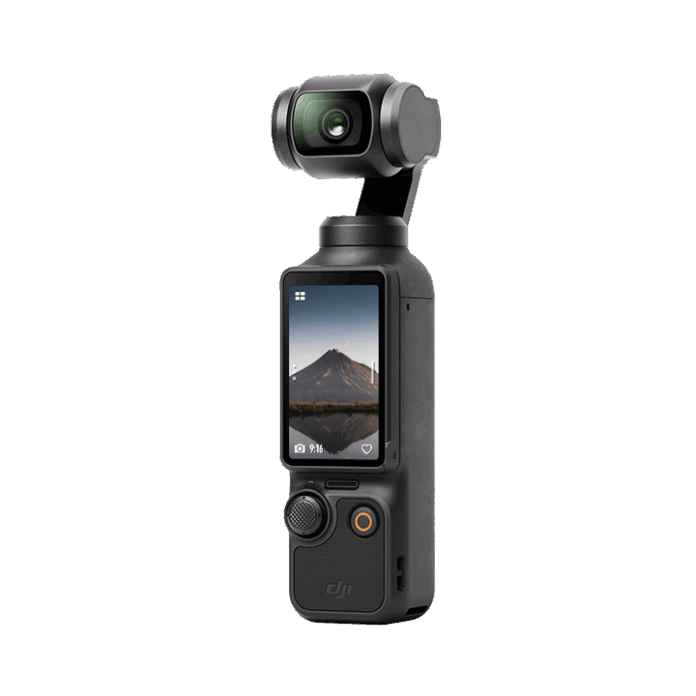
DJI Osmo Pocket 3 review 2026: pros and cons
Pros
- Detailed 4K video and strong low-light quality for the size
- Natural-looking three-axis mechanical stabilization
- Fast full-pixel phase-detection autofocus and ActiveTrack 6.0
- Useful 2-inch rotating touchscreen for horizontal and vertical video
- Direct connection to supported DJI wireless microphones
- Fast charging and optional battery handle
- Small, discreet, and quicker to deploy than a phone gimbal
Cons
- Not waterproof or weather-sealed
- Exposed camera head and moving gimbal require careful storage
- Fixed 20mm-equivalent lens is wide but not versatile
- Built-in battery cannot be swapped
- No internal storage; a microSD card is required
- Still images are only about 9.4MP
- Pocket 4 is technically superior where it is officially available
DJI Osmo Pocket 3 key specifications
| Specification | Osmo Pocket 3 |
|---|---|
| Sensor | 1-inch CMOS |
| Lens | 20mm equivalent, f/2.0, 20cm minimum focus |
| Normal video | Up to 4K/60 |
| Slow motion | Up to 4K/120 |
| Color | Normal, HLG, and 10-bit D-Log M |
| Maximum bitrate | 130 Mbps |
| Video formats | MP4 using H.264 or HEVC |
| Photo resolution | Approximately 9.4MP; JPEG or JPEG+DNG |
| Stabilization | Three-axis mechanical gimbal |
| Screen | 2-inch rotating touchscreen, 700 nits |
| Microphones | Three built-in microphones |
| Storage | microSD up to 1TB; no internal storage |
| Battery | 1,300mAh built in; up to 166 minutes under DJI test conditions |
| Weight | 179 g |
| Waterproofing | None |
These figures match DJI’s official Pocket 3 specifications. Two details deserve emphasis: 4K/120 is a dedicated slow-motion mode rather than normal real-time recording, and DJI does not support ProRes. Claims of 16MP photos, interchangeable batteries, or weather sealing are incorrect.
Video quality: the reason to buy it
The 1-inch sensor gives the Pocket 3 a real advantage over most conventional action cameras. In daylight it resolves plenty of detail for 4K delivery, while faces and interiors hold together better as light falls. The 20mm-equivalent f/2.0 lens is wide enough for handheld vlogging without producing the extreme perspective of many action-camera modes.
Low light is strong for a camera this small, not limitless. The dedicated Low-Light mode can raise sensitivity further, but noise reduction eventually removes fine texture and moving subjects can blur as shutter speed falls. Stable city scenes, restaurants, and evening walks suit it better than fast action in near darkness. A full-frame camera with a fast lens still has much greater image-quality headroom.
Normal color is the efficient choice for footage that must be shared quickly. HLG makes sense for a compatible HDR workflow. Ten-bit D-Log M preserves more grading flexibility, but it needs correction in post and does not magically add light or focus latitude. Use a fixed white balance and sensible exposure when matching several shots; color mode alone cannot repair inconsistent capture.
Gimbal stabilization and ActiveTrack
The mechanical gimbal is what separates the Pocket 3 from an action camera. Instead of heavily cropping and warping the frame to hide movement, it physically controls pan, tilt, and roll. Pans can look smoother, low-light footage avoids some electronic-stabilization artifacts, and the camera can follow a subject while standing on its mini tripod.
It does not remove the vertical bounce from every walking shot. Holding the camera loosely, bending the knees slightly, and avoiding abrupt direction changes still improve the result. The gimbal also has physical limits: fast whips can reach an axis stop, strong wind can disturb it, and impacts can damage the mechanism.
ActiveTrack 6.0 can keep a face or selected object framed while you move or present. Dynamic Framing places a tracked subject away from the center for a more deliberate composition. Tracking is valuable for solo work, but it should be tested before an unrepeatable take; occlusion, very fast movement, or a visually similar crowd can still confuse it.
Handling, screen, and durability
Rotating the 2-inch OLED screen can power the camera on and switch between horizontal and vertical shooting. The interface exposes frame rate, tracking, gimbal behavior, and Pro controls without requiring a phone. The joystick is useful for deliberate framing, although the small display is better for composition and status than critical focus or exposure judgment.
At 179 g, the Pocket 3 fits a jacket pocket or small pouch, but the name should not encourage careless storage. DJI gives the gimbal an axis lock, yet hard objects can press against the camera head. Use the protective cover in a backpack, avoid forcing an obstructed gimbal during startup, and keep the lens and screen away from keys or grit.
The Pocket 3 is not waterproof. It has no published IP rating and should not be trusted in drizzle, spray, blowing dust, or at the beach without protection. For skiing, kayaking, rain, cycling mounts, or underwater footage, an action camera is the safer tool.
Audio and the Creator Combo
The three built-in microphones are useful for ambient sound and casual speech in quiet conditions. Directional Audio and wind-noise reduction help, but a small handheld camera cannot isolate a voice from traffic, wind, or a reverberant room as effectively as a microphone close to the speaker.
The camera can connect directly to supported DJI transmitters without a receiver occupying the USB-C port. Current DJI support information includes Mic 2 and Mic Mini compatibility and connection to two supported transmitters. Third-party digital USB-C microphones and analog microphones through a suitable USB-C-to-3.5mm adapter are also options.
| Bundle choice | Who it suits |
|---|---|
| Standard Combo | Buyers who already own audio, power, and support accessories or mainly record ambient sound |
| Creator Combo | Solo vloggers who will use the included DJI Mic 2 transmitter, battery handle, mini tripod, wide-angle lens, and carrying bag |
The Creator Combo is not automatically better value. Price the accessories you will genuinely use. Its single Mic 2 transmitter is excellent for one presenter, but a two-person interview still needs another compatible transmitter or a different audio kit. The wide-angle lens helps at arm’s length, while the standard 20mm view usually looks more natural when space allows.
Battery, charging, storage, and app workflow
DJI rates the built-in battery for 166 minutes at 1080p/24 with Wi-Fi and the screen off. That is a controlled maximum, not a promise for stabilized 4K recording. Screen use, wireless audio, tracking, high frame rates, temperature, and repeated standby cycles reduce runtime. Because the battery is not removable, long shoots require USB-C power or the optional battery handle.
With DJI’s specified 65W PD charger, the company reports 80% in 16 minutes and a full charge in 32 minutes. The battery handle adds a rated 103 minutes under similar laboratory conditions and provides a more comfortable grip. When recording from external power, the camera draws from the input and resumes charging after recording stops.
There is no built-in storage. Use a supported V30 microSD card, format it in the camera, and carry a spare for important work. The camera records standard MP4 files in H.264 or HEVC, so footage imports directly into common editors. HEVC is more efficient but can be harder on older computers.
DJI Mimo handles activation, firmware, remote control, transfer, and quick editing. It does not create automatic cloud backup. Copy footage to a second device or drive before formatting a card. US buyers should follow DJI’s current official installation guidance rather than downloading the app from an unknown mirror.
DJI Pocket 3 vs Pocket 4 and Pocket 4P
| Model | Main advantage | Best fit |
|---|---|---|
| Osmo Pocket 3 | Proven, smaller investment, and established US retail availability | Most US vloggers, travelers, and family-video buyers |
| Osmo Pocket 4 | New stacked sensor, 4K/240 slow motion, longer rated runtime, internal storage, and newer tracking | Buyers with official local availability who will use the upgrades |
| Osmo Pocket 4P | 20mm and 60mm cameras, higher claimed dynamic range, and D-Log 2 | Advanced creators who need portrait compression and a wider focal-length range |
The Pocket 4 is the true successor. DJI announced it in April 2026 with a new stacked 1-inch sensor, up to 4K/240 slow motion, 107GB of usable internal storage, a 240-minute laboratory runtime, and ActiveTrack 7.0. Those are meaningful improvements. They do not make good Pocket 3 footage obsolete.
The US decision is different from the global one. At publication, the Pocket 4 and Pocket 4P were not part of DJI’s normal official US retail launch, while the Pocket 3 remained readily obtainable. An imported newer model may involve marketplace pricing, app access, returns, and warranty uncertainty. Verify the seller and DJI support eligibility before treating a gray-market Pocket 4 as a simple upgrade.
Pocket 4P is a more specialized step up. Its second 60mm-equivalent f/1.8 camera provides a genuinely different perspective for portraits and details, but the device is larger, heavier, and aimed at creators who will use the extra lens and grading latitude. It is not the default recommendation for a first pocket camera.
Pocket 3 vs an action camera or smartphone
Choose the Pocket 3 for smooth walking footage, faces, low-light travel scenes, controlled pans, discreet interviews, and solo tracking. Choose an action camera for water, rain, impacts, very wide point-of-view footage, helmet or vehicle mounting, and swappable batteries. Our best vlogging cameras guide compares it with larger creator cameras as well.
A recent flagship phone can beat the Pocket 3 for stills, focal-length flexibility, computational HDR, and immediate editing. A phone gimbal can also produce smooth footage, but it takes longer to balance and occupies the device used for navigation, communication, and editing. Pocket 3 wins when a dedicated, one-handed video tool makes you more likely to capture the shot.
Who should buy the Osmo Pocket 3?
Buy it if:
- You prioritize compact, stabilized video over still photography.
- You record travel, family, interviews, walk-and-talk clips, or behind-the-scenes footage.
- You want reliable subject tracking without carrying a phone gimbal.
- You are in the US and prefer an established retail and support path.
- The Pocket 3 and Creator Combo discounts make more sense than importing a Pocket 4.
Skip it if:
- You need waterproofing, impact resistance, or body mounting.
- You mainly shoot photos or want multiple focal lengths.
- You require a removable battery or internal storage.
- You already own a phone and gimbal combination that fits your workflow.
- Pocket 4 is officially supported in your market and its upgrades justify the difference.
Settings that improve Pocket 3 footage
- Use 4K/30 for general work and 4K/60 when movement needs smoother rendering. Reserve 4K/120 for intentional slow motion.
- Set shutter speed manually with an ND filter when natural motion blur matters; otherwise let Auto protect a spontaneous shot.
- Lock white balance across a sequence to prevent color shifts between clips.
- Use Follow mode for natural handheld movement, Tilt Locked for level walk-and-talk framing, and FPV only when deliberate roll is part of the look.
- Place a wireless microphone close to the speaker and monitor its level before a one-take recording.
- Protect highlights in D-Log M and test your conversion workflow before an assignment.
Final verdict
This DJI Osmo Pocket 3 review reaches a more nuanced 2026 verdict than “buy the latest.” Pocket 4 is the better camera on specifications, but Pocket 3 remains the safer and often better-value choice for many US buyers. Its 1-inch sensor, mechanical gimbal, autofocus, rotating screen, and direct wireless audio still solve the core vlogging problem extremely well.
Buy it for deliberate handheld video and protect it like a small camera, not an action cam. Choose the Standard Combo if you already own the supporting gear; choose the Creator Combo when its microphone, battery handle, tripod, and wide adapter will all enter your real workflow. For broader travel options, see our travel camera guide.
Frequently asked questions
Is the DJI Osmo Pocket 3 waterproof?
No. DJI explicitly states that the Pocket 3 is not waterproof. Keep it away from rain, spray, and submersion, and use an action camera for wet or impact-heavy environments.
Does Pocket 3 record 4K/120 video?
Yes, in its dedicated slow-motion mode. Normal real-time video reaches 4K/60. Slow motion has different audio and shooting limitations, so it is not a substitute for every 4K recording mode.
How many megapixels are Pocket 3 photos?
DJI specifies approximately 9.4MP. It can save JPEG and DNG files, but still photography is not its main strength.
Is the Pocket 3 Creator Combo worth it?
Yes for a solo creator who will use the included Mic 2 transmitter, battery handle, mini tripod, wide-angle lens, and bag. The Standard Combo is better when you already own audio and power accessories.
Should US buyers choose Pocket 3 or Pocket 4?
Pocket 3 is the lower-risk choice when official US retail availability, returns, warranty support, and cost matter. Pocket 4 is technically better, but verify the seller and DJI support eligibility before importing one.