Contents
- Who the Canon PowerShot V1 is really for
- Design, build quality and handling in the field
- Sensor, image quality and low light performance
- Lens performance, stabilization and zoom range
- Autofocus, speed and reliability for moving subjects
- Video features, audio and vlogging usability
- Connectivity, battery life and everyday usability
- Canon PowerShot V1 vs rivals and key pros and cons
- Best settings, accessories and shooting tips
- Value for money and final verdict for creators
Who the Canon PowerShot V1 is really for
Target users and shooting scenarios
When considering any camera, matching its strengths with your needs is essential. The Canon PowerShot V1 is built with a clear user in mind. This camera is for creators who value portability, dependable photo and video quality, and quick access to manual controls without hauling a large system. If you shoot travel, street, behind-the-scenes content, or want a capable everyday camera for both stills and video, the PowerShot V1 fits that role well.
It is also a smart pick for hybrid content creators who need a compact device for vlogging, quick interviews, or social media. The V1 blends ease of use with creative flexibility, making it ideal for on-the-go work where you may not have time or space for lens changes or a tripod. Many travel photographers, YouTubers, and even pro shooters who want a backup to their primary camera will find the V1 a practical companion.
How it fits into Canon’s lineup
Canon’s camera lineup covers everything from basic compacts to advanced mirrorless bodies. The PowerShot V1 sits between entry-level point-and-shoots and the EOS R series. It offers more manual control and better photo/video features than basic compacts, but is smaller and easier to carry than an interchangeable lens model.
The V1 is part of a new wave of compact digital cameras, which are regaining popularity in 2026 as creators look for reliable, pocketable options that outperform smartphones. Its core appeal is that it brings much of Canon’s color science, autofocus, and usability to a truly portable form factor.
Who should skip the PowerShot V1
If you need ultra-fast burst rates, the highest possible image quality, or interchangeable lenses, the PowerShot V1 may not be for you. Professional sports shooters, wildlife photographers, or those who require extensive lens options will find the V1 limiting.
Additionally, anyone who already owns a recent Canon mirrorless body with a lightweight lens might not gain enough from the V1’s compactness alone to justify adding it. Smartphone shooters who never use manual controls may also find the V1’s feature set more than they need.
Where it makes sense in a pro workflow
For working photographers and filmmakers, the PowerShot V1 makes a strong argument as a second or third camera. It’s perfect for situations where a larger camera would draw unwanted attention or be impractical to carry. I often use it for location scouting, test shots, or quick street candids.
Its ready-to-go nature means you can have it in your jacket pocket, ready to capture moments you might miss if you had to set up a larger kit. The V1 also serves as a solid b-camera for video, especially for behind-the-scenes clips, time-lapses, or as a discrete interview angle.
Design, build quality and handling in the field
First impressions and ergonomics
Picking up the Canon PowerShot V1 for the first time, the compactness is immediately noticeable. The body feels solid, with enough heft that it does not come across as a toy, but it is much lighter than any mirrorless setup I own. The grip is subtle but functional, and the camera balances well in hand, even for extended shooting sessions.
For photographers with larger hands, the V1 might feel a bit cramped, but the overall layout is intuitive. It is easy to shoot one-handed, and the flat front makes it slip into a small bag or jacket pocket without fuss.
Buttons, dials and customization options
One of the V1’s biggest strengths is its control scheme. There are dedicated dials for exposure compensation and mode selection, plus customizable function buttons that let you quickly access ISO, white balance, or autofocus settings. The rear wheel and joystick are responsive, making menu navigation fast.
In practice, I found I could adjust shooting settings without taking my eye off the subject for long. Unlike some compacts that bury key controls in menus, the V1 puts them at your fingertips. For creators who switch between stills and video often, this saves time and frustration in the field.
Screen, viewfinder and visibility outdoors
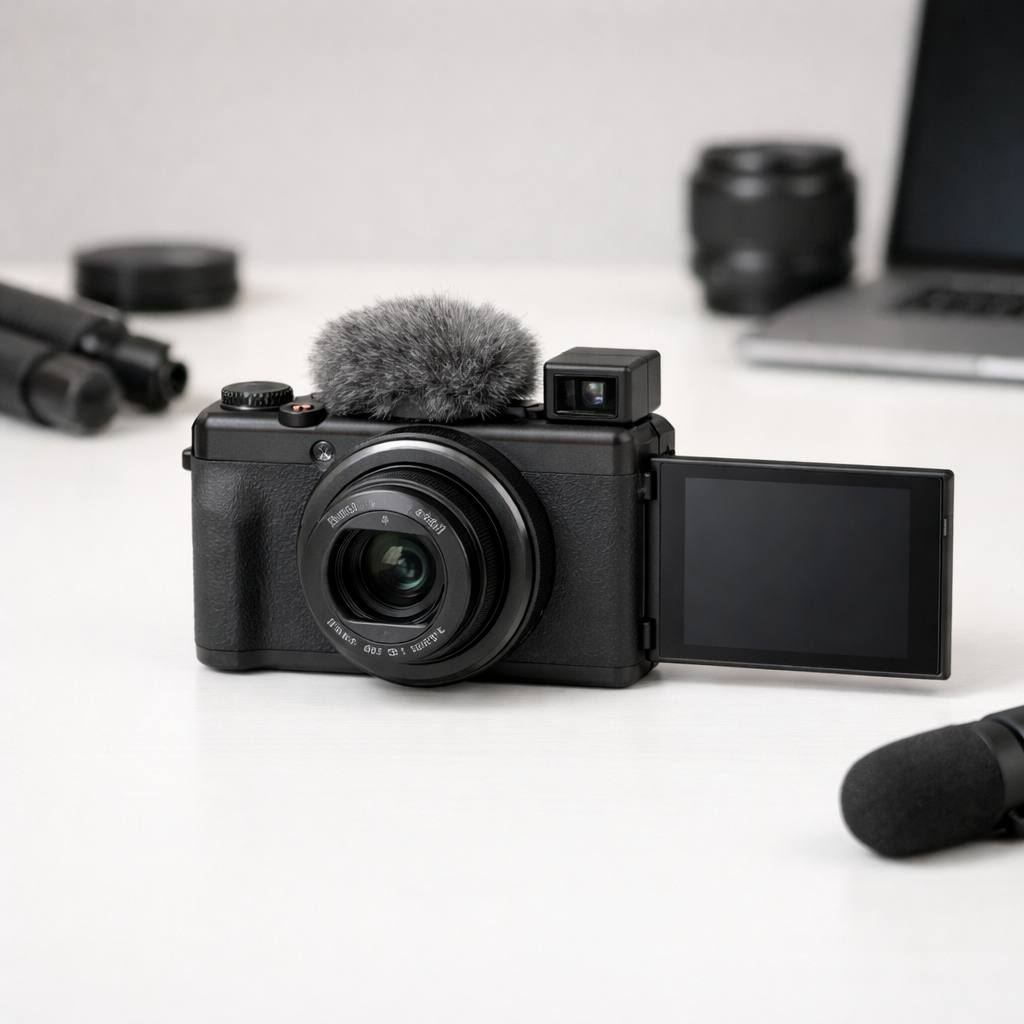
The fully articulating LCD is bright, sharp, and touch-sensitive. It makes composing shots at tricky angles or filming yourself much easier. Outdoors, the screen remains visible even in strong sunlight, though like most compact cameras, direct glare can still be a challenge.
There is no built-in electronic viewfinder, which some advanced shooters might miss. However, for travel, vlogging, and street work, I rarely found this to be an issue. Most users will rely on the screen for composition, and it performs admirably for both stills and video.
Portability, durability and travel readiness
For travel photographers, portability is a top priority. The Canon PowerShot V1 excels here. It fits easily into a small sling, purse, or even a large pocket, making it an ideal travel companion. The solid build gives confidence that it can handle daily bumps and light rain, though it’s not weather-sealed.
After weeks of field use, including crowded city streets and dusty trails, my V1 still looks and feels new. The lens mechanism retracts smoothly, and the buttons have held up well under frequent use. This is a camera you can toss in your bag and trust to work when you need it.
Sensor, image quality and low light performance
Resolution, dynamic range and color science
The Canon PowerShot V1’s sensor delivers impressive results for its size. Resolution is plenty for prints up to A3 and looks crisp on screens. The dynamic range is solid, allowing you to recover highlights and bring out shadow detail in post-processing.
Canon’s color science is a highlight. Straight-out-of-camera JPEGs display natural colors and pleasing skin tones, which is a big advantage for quick social sharing. Landscapes have rich greens and blues without looking over-processed.
JPEG vs RAW and how files respond to editing
Shooting RAW unlocks more editing latitude, especially for challenging lighting. The V1’s RAW files are surprisingly robust, letting you adjust exposure, white balance, and contrast without the files falling apart. JPEGs are excellent for those who want fast results, but I recommend RAW for serious editing.
I found that even after heavy adjustments, files retained detail and did not become overly noisy or flat, which is impressive for a compact sensor. This makes the V1 suitable for both casual shooters and those who want to push their images further.
High ISO noise and real low light examples
Low light is a classic challenge for compact cameras. The V1 holds up well up to ISO 1600, with only moderate grain. At ISO 3200 and above, noise becomes more visible, but the grain is fine rather than blotchy, and color fidelity remains decent.
In real-world use, I have shot night street scenes and indoor events where lighting was poor. With careful exposure and some noise reduction in post, the images are very usable. If you often shoot in dark environments, the V1 will do the job, though not at the level of a full-frame camera.
White balance and skin tones for people shots
Canon is known for accurate and flattering skin tones, and the PowerShot V1 continues that tradition. Auto white balance is reliable in most situations, though it can struggle with mixed light. Fortunately, manual adjustments are quick.
I have photographed portraits in sunlight and under artificial light, and skin tones look natural with minimal tweaking. For creators filming themselves or others, this reliability is a big plus.
Lens performance, stabilization and zoom range
Focal length coverage and real-world versatility
The built-in zoom lens is a key advantage for travelers and creators. It covers a practical range from wide-angle to short telephoto, ideal for landscapes, groups, portraits, and even close-ups. This flexibility means you rarely miss a shot because you have the wrong lens attached.
Sharpness, distortion and optical character
Image sharpness is consistent across the zoom range, with only minor softness at the far telephoto end. Lens distortion is well-controlled, and chromatic aberration is minimal. The lens has a pleasing rendering that flatters both people and places, giving your images a professional look.
Image stabilization for stills and video
Canon’s optical image stabilization is effective for both stills and video. Handheld shots at slower shutter speeds stay sharp, and video footage remains smooth even while walking. This makes the V1 an excellent choice for run-and-gun shooting, travel logs, or casual vlogging.
Close focusing, bokeh and background separation
For a compact camera, the V1 focuses close enough for food, nature, or product shots. At the wide end, you can get right up to your subject. Bokeh is smooth and attractive, especially at the lens’s widest aperture, though it is not as pronounced as on larger sensor cameras. Still, you can achieve good subject separation for portraits and detail shots.
Autofocus, speed and reliability for moving subjects
AF modes, subject detection and tracking
The autofocus system is fast and reliable for most subjects. It includes face and eye detection, which works well for people and pets. Subject tracking is sticky, following moving subjects across the frame with confidence.
Switching between AF modes is simple, and the camera rarely hunts or misses focus in good light. For creators filming themselves or working with kids and pets, this takes the stress out of capturing sharp images and video.
Performance for street, kids and pets
On the street, the V1 locks focus quickly, allowing you to react to fleeting moments. For family events or pet photography, the autofocus keeps up with unpredictable movement. In low light, focus slows slightly but remains accurate for still subjects.
Burst shooting, buffer and shutter behavior
Burst shooting is decent for a compact. You can capture a short series of action shots, such as a child running or a cyclist passing by. The buffer clears quickly, so you’re not left waiting between bursts. The shutter is quiet and responsive, which helps for candid and street work.
Hit rate compared to larger Canon bodies
Compared to Canon’s mirrorless cameras, the V1’s autofocus is not as advanced, but the hit rate is impressive for its class. In my experience, focus accuracy is high for everyday subjects. For demanding sports or fast wildlife, a larger body still has the edge, but most creators will be happy with the V1’s speed and reliability.
Video features, audio and vlogging usability
Resolution, frame rates and recording limits
When examining the Canon PowerShot V1 video capabilities, you quickly notice that Canon built this camera with the hybrid creator in mind. The V1 shoots 4K video at up to 30 frames per second and can record Full HD at 60 frames per second. These settings are ideal for both straightforward vlogging and capturing action with smooth motion. For creators who want cinematic slow motion, the 120p mode in HD provides extra flexibility, though it comes with a slight crop and reduced detail.
Recording limits are a practical consideration. In 4K, the V1 records clips up to 30 minutes, which is standard for compact cameras in this class. Overheating is rare in everyday use, even during long travel days, but direct sunlight and high temperatures can push the camera to its thermal limits. For most vlogging and travel scenarios, you will rarely hit these constraints.
Video quality, rolling shutter and color
The PowerShot V1 delivers pleasing video quality, especially in good light. Canon’s color science shines, producing natural skin tones and vibrant landscapes straight out of the camera. In my experience, the 4K footage holds up well for YouTube and social media, with detail that rivals many entry-level mirrorless bodies.
Rolling shutter is present, as expected with a compact sensor, but it is well controlled unless you pan very quickly or film fast-moving subjects. In these situations, minor skewing is visible, but it won’t ruin casual travel or lifestyle footage.
Low-light video shows the typical trade-offs for compact cameras: there is some noise at higher ISO settings, but Canon’s processing keeps it under control. For creators who want maximum flexibility, the V1 offers a basic flat profile for easier color grading, though it lacks the advanced log options found on higher-end models.
Built-in mics, external audio and monitoring
Audio quality can make or break vlogs, and the Canon PowerShot V1 does not disappoint. The built-in stereo microphones are a step above most compact cameras, capturing clear dialogue and ambient sound for on-the-go content. However, wind noise is still a challenge, so the included wind muff is a must for outdoor shooting.
For serious creators, the external 3.5mm mic input is a game-changer. Plugging in a compact shotgun mic or wireless lavalier raises audio quality to semi-professional levels. There is also a headphone output for monitoring, though you will need a splitter if you want to monitor while recording.
Canon’s on-screen audio meters and manual level controls are easy to access, allowing quick tweaks without diving through menus. For solo shooters, this makes it simple to avoid clipping and ensure clean sound.
Vlogging experience, selfie use and live streaming
The Canon PowerShot V1 vlogging experience is enhanced by its fully articulating touchscreen, which flips forward for easy framing during selfie shooting. The camera’s compact size and light weight make it ideal for handheld vlogging, and the grip is comfortable for extended sessions.
Face tracking autofocus is fast and reliable, locking onto your eyes even as you move around the frame. This is invaluable for dynamic walk-and-talk videos. The camera’s digital IS does a decent job of smoothing out minor shakes, though it cannot match the stabilization of larger mirrorless systems.
For live streaming, the V1 supports direct USB streaming to a computer, making it a solid choice for creators who want to upgrade their virtual presence. The setup process is straightforward, and Canon’s software makes the camera plug-and-play for most platforms.
Connectivity, battery life and everyday usability
Battery performance and real shooting endurance
When assessing Canon PowerShot V1 battery life, real-world use tells the story. The camera is rated for roughly 260 shots per charge, but this figure varies with video use, Wi-Fi, and screen brightness. In practice, you can expect one battery to last through a half-day of mixed shooting – photos, short video clips, and some review time.
For all-day adventures or intense video sessions, bringing a spare battery is highly recommended. Fortunately, the batteries are small and affordable, so adding extras to your kit is easy.
Charging options and power bank use
Modern creators demand flexible charging, and the V1 delivers. The camera charges via USB-C, so you can top it up with a standard wall adapter or a power bank while on the go. This is a major advantage for travelers who want to shoot all day without hunting for outlets.
You can also power the camera directly via USB-C for longer shoots or streaming setups, which is perfect for creators who film in a studio or at their desk.
Wi-Fi, Bluetooth and app integration
Canon PowerShot V1 connectivity is robust, supporting both Wi-Fi and Bluetooth. The Canon Camera Connect app allows quick image and video transfers to your phone – ideal for sharing to Instagram or TikTok on the fly. The connection process is smoother than older Canon models, with simple pairing and reliable transfers.
Remote control is also possible via the app, letting you start recording, adjust settings, and even preview your shot from a distance. This is particularly useful for solo creators or travel photographers shooting group shots.
Menus, firmware and overall reliability
Canon’s menu system is straightforward, with logical categories and customizable shortcuts. The touchscreen responds quickly and makes it easy to adjust key settings on the fly. I rarely found myself lost or hunting for functions, which is a relief when working fast.
Firmware updates are delivered via the app or SD card, and Canon has a solid track record of supporting its compact cameras with bug fixes and minor feature additions. In field use, the V1 has proven stable and reliable, with only occasional slowdowns when shooting extended 4K sessions.
Canon PowerShot V1 vs rivals and key pros and cons
Canon PowerShot V1 vs Canon EOS R50 and similar bodies
Comparing the Canon PowerShot V1 to the Canon EOS R50, you see clear differences. The R50, with its larger sensor and interchangeable lenses, offers better image quality and flexibility, especially for demanding photography work. However, the V1’s compact size and built-in lens make it the winner for pocketability and spontaneous shooting.
The V1 is less intimidating for beginners and travelers who want a simple, all-in-one solution without the hassle of lens changes.
Canon PowerShot V1 vs Sony ZV and compact competitors
The Sony ZV line, especially the ZV-1, is a direct competitor. Both cameras target vloggers, but the Canon PowerShot V1 stands out with its color science, touch interface, and more intuitive controls. The Sony offers slightly better autofocus in video, but the Canon’s overall user experience feels more polished for beginners and casual creators.
Other compact rivals, like the Panasonic Lumix LX100 II, deliver strong image quality but lack the dedicated vlogging features and app integration of the V1.
Main strengths and where it clearly shines
– Excellent color and skin tones, especially for travel portraits and vlogs
– Reliable autofocus with effective face tracking
– USB-C charging and easy app integration for modern workflows
– Intuitive handling, fully articulating touchscreen, and compact build
Limitations, compromises and who will feel them most
– No advanced log profiles for pro-level video grading
– Fixed lens limits flexibility for specialized photography
– Battery life requires spares for extended shooting
– Rolling shutter can be an issue for fast pans or action sports
Photographers and filmmakers who need ultimate flexibility or pro-grade video will feel these limits most. However, for travel, lifestyle, and everyday content, these compromises are easy to accept.
Best settings, accessories and shooting tips
For general use, set the camera to aperture priority with f/2.8 for nice background blur. Enable face tracking autofocus for vlogging, and assign custom buttons to quickly toggle IS and shooting modes. I recommend leaving auto ISO on for fast-changing light conditions.
Recommended photo and video profiles
Use the Standard color profile for vibrant yet natural results. For video, the Neutral profile offers a flatter look that is easier to grade in post. If you plan to edit heavily, experiment with manual white balance to keep colors consistent.
Must-have accessories to unlock its potential
– Extra batteries and a USB-C power bank for all-day shooting
– Compact shotgun or wireless lavalier microphone for clean audio
– Small tripod or vlogging grip for stable footage and flexible angles
– Lens cleaning kit for travel and outdoor use
Practical shooting tips from real assignments
– Always carry a spare battery and memory card
– Use touch focus to quickly switch subjects while vlogging
– Keep the wind muff on outdoors to avoid ruined audio
– Leverage app remote control for group shots and solo travel selfies
Value for money and final verdict for creators
Price positioning and long-term value
The Canon PowerShot V1 value proposition is strong in 2026, as compact digital cameras regain popularity. It sits above basic point-and-shoots but below entry-level mirrorless models, balancing price and features for creators who want quality with convenience.
Who gets the most out of this camera
Travelers, vloggers, and hybrid content creators who want a reliable, pocketable camera will benefit most. It is ideal for those who need better results than a smartphone but do not want the complexity of interchangeable lens systems.
How it fits into a multi-camera kit
The V1 is a perfect second camera for seasoned photographers, offering a “go anywhere” option for casual days or risky environments. It also works well as a dedicated vlogging or streaming camera alongside a larger main body.
Final verdict and buying recommendations
To conclude this Canon PowerShot V1 review, the camera delivers a compelling mix of portability, image quality, and creator-focused features. Its strengths in color, autofocus, and usability make it a top choice for travelers and aspiring vloggers. While it cannot match the flexibility of a mirrorless system, it is one of the best compact options available in 2026. If you want a camera that fits in your pocket and supports your creative journey, the PowerShot V1 deserves a spot in your kit.