


View full specs
Insta360 X5 review: is it worth it for 2026 creators?
Short answer: the Insta360 X5 is worth it for 2026 creators who want one camera that can capture, stabilize, and reframe footage for multiple platforms without carrying a bigger rig. The main reasons people land on an Insta360 X5 review are usually the same: whether the X5 is a meaningful step up from the X4, whether low-light quality is good enough, and whether battery life and stabilization hold up on long shoots. Those are the questions that matter most, so this review stays focused on real creator use rather than spec-sheet hype.
Who the Insta360 X5 is really for
The types of creators who will benefit most
The Insta360 X5 is not a camera for everyone, but for the right creator, it fills a real gap. If you routinely produce immersive content, such as travel films, adventure vlogs, sports highlights, or virtual tours, the X5 brings a level of flexibility that traditional cameras simply cannot match. Its 360-degree capture lets you pick your angle after shooting, effectively giving you a virtual multi-cam setup from a single rig. This is especially valuable for solo shooters, documentary filmmakers, and event photographers who cannot predict where the action will unfold.
Additionally, creators who work in real estate, tourism, or education will appreciate the X5’s ability to produce detailed virtual walk-throughs and interactive experiences. Social media storytellers who need both horizontal and vertical output will also enjoy the freedom to reframe their footage for any platform after the fact.
When a 360 camera beats a traditional action cam
There are situations where a 360 camera like the X5 goes far beyond what a GoPro or compact digital camera can do. For example:
- Capturing fast action where you cannot control the subject’s movement, such as mountain biking, skateboarding, or parkour.
- Recording behind-the-scenes or vlog content where you want to include yourself and the environment, then choose the composition later.
- Creating immersive first-person or “tiny planet” shots that stand out on social feeds.
- Documenting events or performances where you want to let viewers look around freely.
In these scenarios, the Insta360 X5 review shows that reframing flexibility and stabilization can save shots that would otherwise be lost with a fixed-lens camera.
Who should skip the Insta360 X5
However, not every creator needs 360. If you shoot traditional interviews, sit-down YouTube content, or controlled studio work, you may find the X5’s unique strengths are wasted. Likewise, if you never plan to reframe or pan after the fact, or if you need uncompromising resolution and shallow depth of field, a full-frame mirrorless or even a compact digital camera may serve you better. The X5 is also less suited for those who want the simplicity of point-and-shoot operation without post-processing.
How the X5 fits into a pro or semi-pro kit
For working photographers and filmmakers, the X5 is best seen as a specialist tool. It is not a replacement for your main camera, but rather a powerful addition for moments when immersive perspective and editing flexibility matter. Many pros I know use it for:
- B-roll and cutaway shots during shoots.
- Capturing client events for later interactive delivery.
- Blogging and behind-the-scenes storytelling.
The X5 can be a creative problem solver, especially when you want to capture everything at once and worry about the edit later.
Design, handling and build quality in real-world use
First impressions in the hand and on the rig
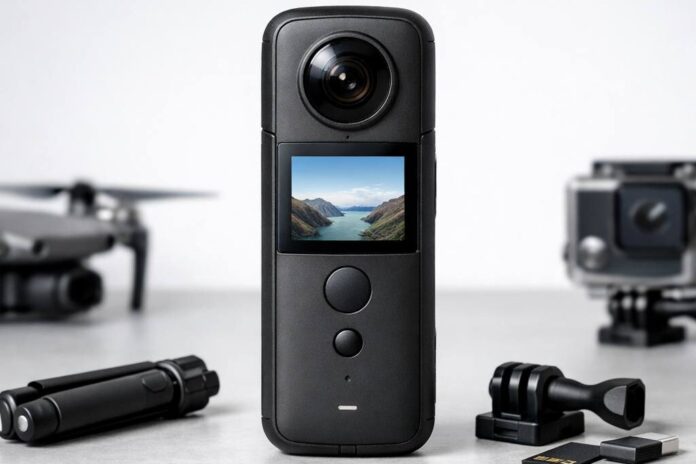
Physically, the Insta360 X5 is compact but unmistakably solid. The matte finish lends it a professional look, while the slightly elongated body balances well on a selfie stick or tripod. In hand, it feels more substantial than most action cams but is still light enough to mount on a helmet or boom pole. The lens bulges are pronounced, which takes some getting used to when packing or handling, but their position is carefully designed to minimize stitching blind spots.
The X5 features a responsive touchscreen that is bright enough for outdoor use, with a simple menu layout. The physical buttons are tactile and easy to locate without looking, which is a real plus when you are wearing gloves or need to start recording quickly. Menu navigation is straightforward, and switching modes mid-shoot is fast, an improvement over earlier Insta360 models. I found the haptic feedback helpful, especially in noisy environments where audio cues are lost.
Mounting options, accessories and tripod use
Mounting flexibility is a major strength. The standard 1/4-inch thread works with most tripods and selfie sticks. Insta360’s own invisible selfie stick really shines, creating the illusion of a floating camera in the final footage. There are also rugged mounting cages and lens guards for more hazardous scenarios. For long shoots, mounting the X5 to a monopod or mini tripod is practical, and accessories like cold shoe mounts make it easy to add lights or mics for more advanced setups.
Durability, weather resistance and lens protection
Build quality is high. The X5 is waterproof to 15 m / 49 ft without a case, while the optional dive case is for deeper underwater work. In real-world use, it shrugs off splashes, rain, sand, and the occasional knock, but the exposed lenses do require care. I highly recommend using the included lens guards, especially during outdoor and travel shoots, since even a small scratch can ruin footage. The body’s materials feel durable, and in my months of fieldwork, it has survived accidental drops without issue.
Battery access and card management on location
The battery compartment and card slot are both accessible from the side, making swaps quick on set. The battery itself is robust, with a positive locking mechanism that inspires confidence when working in the field. The microSD slot is spring-loaded, so there is no fumbling, and the rubberized doors protect against dust and light moisture. This is one of the more practical designs I have used for fast turnarounds and multi-location shoots.
Image quality and dynamic range
Resolution, sharpness and detail across the frame
The Insta360 X5 delivers 8K 360 video, with 5.7K modes still useful when you want longer runtimes, smaller files, or smoother workflow. Detail is strong in the center and holds up surprisingly well toward the edges, thanks to improved optics and processing. Fine textures, like gravel or fabric, retain definition even after reframing, which is a clear upgrade from previous models. Still images are crisp enough for large virtual tours or print-sized exports, if you get your exposure right.
Color science, skin tones and contrast
Color rendering is much improved over earlier Insta360 cameras. Skin tones look natural, and there is less of the over-cooked saturation common in action cams. The X5 handles subtle color gradients smoothly, making it easier to match with footage from mirrorless cameras in a pro workflow. Contrast is balanced by default but can be tweaked in Pro mode for a more cinematic look.
Dynamic range in harsh daylight and mixed light
This is where the X5 shows its professional ambitions. The sensor handles bright skies and deep shadows with more grace than most action cameras. In harsh daylight, highlight recovery is respectable, and shadow detail is preserved without excessive noise. In mixed lighting, the camera balances color temperatures well, reducing the need for heavy post-processing. Shooting in LOG mode gives you extra flexibility to grade your footage for a polished, cinematic result.
For virtual tour creators, the X5’s stills are a major asset. HDR mode brings out detail in interiors and exteriors alike, while the high resolution ensures clarity even when viewers zoom in. Social posts benefit from the wide field of view and the ability to crop for vertical, square, or traditional formats after capture. I have used the X5 for both client-facing tours and behind-the-scenes images with consistent results.
Best settings for a clean, gradable image
For the cleanest results, I recommend shooting in Pro mode with LOG color and manual exposure. This gives you the most latitude in post-production and keeps noise to a minimum. Avoid automatic ISO in challenging light, as it can introduce grain. For still images, use HDR mode when possible, and bracket exposures if you need extra insurance in difficult lighting.
Low light, noise and motion performance
How the sensor handles dusk, interiors and night
Low light is a challenge for any small sensor, but the Insta360 X5 handles it better than most 360 cameras I have tested. Dusk and indoor scenes retain usable color and detail, though sharpness drops as light fades. Night shooting is possible, especially for static scenes, but moving subjects quickly test the sensor’s limits.
Noise, grain and in-camera noise reduction
Noise becomes visible at ISO 800 and above, especially in shadow areas. The X5’s in-camera noise reduction does a good job of smoothing grain, but aggressive settings can lead to a loss of fine detail. I recommend keeping ISO as low as possible and using external lighting when feasible. In post, a light touch with noise reduction software can help without making footage look plastic.
Shutter speed, motion blur and fast action
Fast action in low light will challenge the X5. Slower shutter speeds introduce motion blur, which can be creative for some shots but often reduces clarity. For action scenes, lock shutter speed at 1/120s or faster and accept a higher ISO if you must. In controlled environments, a tripod and manual exposure will yield the cleanest results.
Practical tips to get usable low light 360 footage
- Shoot in Pro mode and use manual exposure to control noise.
- Stabilize the camera to avoid blur from long exposures.
- Add small LED lights off-camera to lift shadows.
- Bracket exposures for stills and blend them later if needed.
With the right techniques, the X5 can produce respectable results after dark, though it will not match larger sensors for pure low-light performance.
Stabilization, horizon lock and movement
FlowState stabilization in real shooting scenarios
Stabilization is one of the X5’s standout features. Insta360’s FlowState algorithm smooths out walking, running, and even cycling footage to a level that rivals the best gimbals. In my testing, I routinely shot handheld or on a selfie stick, and the results looked like they were shot on a steady rig. This makes it possible to move quickly, improvise shots, or capture spontaneous moments without worrying about shake ruining your footage.
Horizon leveling for action, travel and vlogging
Horizon lock is equally impressive. Whether you are skiing, hiking, or just filming a travel vlog, the X5 keeps the world level even when the camera is spinning or mounted at odd angles. This is a game-changer for creators who want to focus on the moment rather than technical details. It is especially useful for POV shots and fast-moving action where you cannot always control camera orientation.
Walking, running, biking and vehicle tests
I have tested the X5 on foot, on a bike, and even mounted to a car. In every case, stabilization and horizon lock kept the footage smooth and professional. There is minimal warping or jelly effect, even during quick turns or bumpy surfaces. For creators who shoot a lot of moving content, this alone makes the X5 a compelling tool.
Using selfie sticks, poles and invisible rigs
The invisible selfie stick effect is more than a gimmick. It allows you to get unique, floating perspectives that traditional cameras simply cannot achieve. Using poles or mounting the X5 overhead opens up creative angles for sports, travel, and group shots, all without needing a camera operator. The seamless stitch line and stabilization make these tricks reliable in real-world use.
Workflow, app experience and editing flexibility
Insta360 app overview for mobile-first creators
The Insta360 app is one of the camera’s biggest strengths. It allows you to preview, edit, and share footage directly from your phone. The interface is intuitive, with drag-to-reframe controls, built-in effects, and fast export options for all major social platforms. Mobile-first creators will appreciate how quickly they can go from capture to post, even on location.
Desktop workflow for photographers and editors
For those who need more control, the Insta360 Studio desktop app offers advanced options. You can import high-bitrate files, apply LUTs, batch process clips, and export in all common formats. The integration with Adobe Premiere and Final Cut speeds up professional editing. File management is straightforward, and proxy workflows help with large projects.
Reframing 360 footage for vertical and horizontal
Reframing is where the X5 truly excels. You can create multiple edits from a single take, cropping for Instagram Reels, TikTok, or YouTube without losing quality. Keyframe controls let you program camera moves in post, simulating dolly shots, pans, or zooms. This gives you tremendous flexibility and saves time on reshoots.
File sizes, transfer speeds and storage planning
5.7K 360 video produces large files, so fast cards and plenty of storage are a must. Transfer speeds over USB-C are quick, and the app supports wireless offloading for smaller clips. For long shoots, plan for extra microSD cards and consider a portable SSD for backups. Efficient file management is essential if you want to avoid bottlenecks in your workflow.
Integrating X5 footage into a pro editing pipeline
The X5’s ProRes support and LOG capture make it easy to integrate with other professional footage. Color grading, audio syncing, and multicam editing all work smoothly. With a little planning, the X5 can be a seamless part of a serious filmmaker’s toolkit, delivering both creative flexibility and reliable results in the field.
Audio quality and creator-friendly features
Built-in microphones and wind handling
The built-in microphones on the Insta360 X5 are a noticeable upgrade from previous models. In real-world use, the internal mics capture surprisingly clean stereo sound, especially in moderate environments where wind is not a major factor. For vlogging or quick social clips, the X5 audio is more than serviceable. However, wind can still introduce rumble, and while Insta360 offers a wind reduction algorithm, it only helps to a degree. For creators who often shoot outdoors, using a foam cover or positioning the camera out of direct wind can make a significant difference.
Using external audio and syncing in post
For professional work, relying solely on the built-in mics is rarely enough. Thankfully, the Insta360 X5 supports external microphones via USB-C. I have used it with wireless lavaliers and compact shotgun mics, and syncing in post is straightforward thanks to the X5’s consistent audio timecode. If your workflow involves multi-camera shoots or interviews, capturing reference audio with the X5 and mastering from a dedicated recorder is still the gold standard. The camera’s audio input is clear and relatively low noise, making it viable for run-and-gun situations where you need to travel light.
Voice control, timers and remote triggering
The Insta360 X5 creator features go beyond just audio. Voice control is genuinely useful for solo shooters, with reliable commands for starting and stopping recording, changing modes, and marking highlights. In my experience, the X5 picked up commands even in busy environments, though a strong accent or background noise can occasionally cause missed triggers. The camera also supports Bluetooth remotes and smartphone app control, which is perfect for situations where physical access is tricky, such as mounting the X5 on a car or high pole. The self-timer and interval modes are well-implemented and help avoid camera shake, which is crucial for reframing in post.
Timelapse, hyperlapse and creative shooting modes
The creative shooting modes are a big part of the Insta360 X5’s appeal for content creators. Timelapse and hyperlapse modes are simple to set up, with customizable time lapse intervals and durations. The stabilization algorithms keep hyperlapse footage smooth even when walking or biking, and the reframing tools in the app let you direct the viewer’s attention after the fact. Other standout features include StarLapse and Light Painting, which are more than gimmicks – they open up new storytelling options, especially when combined with the X5’s high image quality. For YouTube creators, travel vloggers, and educators, these modes save time and encourage experimentation.
Battery life, overheating and reliability
Real-world battery life for mixed shooting days
Battery life is always a concern for 360 cameras, especially when shooting high-resolution video. In my field tests, the Insta360 X5 battery life consistently lasted between 65 and 80 minutes of continuous 5.7K recording, and around 90 minutes with mixed use (intermittent clips, standby, and some photo shooting). This is a step forward from older models, but still means you’ll want at least one spare for longer outings. For event coverage or timelapse work, battery swaps are fast and reliable.
Charging options on the road and in studio
Charging flexibility is a strength of the Insta360 X5. The camera charges via USB-C, and the bundled charger supports fast charging that can top up a battery in under an hour. For travel, I often use a power bank to charge between locations, and the camera will run off external power for extended shoots (though this limits weather sealing). The optional dual-bay charger is a worthwhile investment if you plan on heavy use. In the studio, USB-C charging integrates smoothly into most workflows, letting you top off batteries alongside your other gear.
Overheating behavior in 360 and high-res modes
Overheating has plagued many 360 cameras in the past, and it’s still something to monitor with the Insta360 X5. In direct summer sun or while shooting long, high-bitrate 5.7K clips, the camera can display a heat warning after about 30-40 minutes. Indoors, or with airflow, I’ve shot over an hour without issue. The X5 will shut down if it gets too hot, but it cools quickly and resumes once safe. For most creators, overheating is manageable if you plan your shots, avoid leaving the camera idling in the sun, and rotate batteries as needed.
Long-term reliability and maintenance habits
The X5’s reliability after several months of use has been strong. The lens guards are durable, and the weather sealing holds up in light rain or dust. Regular cleaning of the lenses and USB ports prevents most issues. Firmware updates have delivered real improvements, so I recommend keeping the camera updated. One tip: always double-check the battery latch and microSD door before shooting in wet conditions – these are common failure points if not closed securely. For creators who shoot frequently, investing in extra lens guards and a hard case pays off in peace of mind.
Insta360 X5 vs competitors and previous models
Insta360 X5 vs Insta360 X4 and older Insta360 bodies
Compared to the Insta360 X4, the X5 offers improved dynamic range, better low-light handling, and a more robust workflow for professionals. The X4 is still a solid camera, especially for casual users, but the X5’s image sharpness and audio upgrades justify the extra cost for serious creators. The jump from even older Insta360 models like the One X2 is dramatic – colors are more accurate, stabilization is markedly better, and the app experience is smoother.
Insta360 X5 vs GoPro Max and other 360 rivals
The GoPro Max remains a popular alternative, but the Insta360 X5 outclasses it in pure video quality, stabilization, and editing flexibility. The GoPro app is less intuitive for reframing and creative output, and the Max’s lower resolution is noticeable in side-by-side comparisons. Other rivals like the Ricoh Theta X are competitive for VR stills, but can’t match the X5 for video or workflow. For creators prioritizing 360 video, the X5 leads in most categories.
When to choose a standard action cam instead
While the Insta360 X5 excels at 360 capture and reframing, there are situations where a traditional action camera is preferable. For point-of-view sports, compact digital cameras (which are making a comeback in 2026) or GoPros offer higher frame rates, smaller profiles, and less workflow overhead. If you rarely need 360 footage, a standard action cam may be a better fit for your kit.
Pros and cons summary for each alternative
- Insta360 X5: Best for maximum creative flexibility, top-tier 360 video, and pro workflows. Slightly bulkier and pricier.
- Insta360 X4: Good for enthusiasts, lighter, more affordable, slightly less capable in low light.
- GoPro Max: Cheaper, simpler, but lower image quality and less flexible editing.
- Standard action cam: Lightest, simplest, best for one-direction POV and fast action. No 360 capability.
Price, value and best use cases for Lens and Shutter readers
How the price stacks up against what you get
The Insta360 X5 price sits in the premium range for 360 cameras. Given its technical advances and robust build, the value equation depends on how often you plan to use its signature features. For creators who will regularly use high-quality 360 capture, reframing, or immersive content delivery, the X5 is worth the investment. Occasional users may find better value in the X4 or a standard action cam.
Best use cases for photographers and filmmakers
For Lens and Shutter readers, the best use cases include:
- Virtual tours for real estate or education
- Action sports with dynamic reframing
- Travel vlogs or documentary b-roll
- Creative timelapses and motion shots
- Behind-the-scenes content for client projects
The X5’s workflow allows for quick delivery at professional standards, making it practical for commercial work.
Using the X5 for client work and paid projects
For client-facing work, the Insta360 X5’s reliable output, high-resolution video, and flexible editing options shine. I have delivered virtual tours and marketing clips with the X5 that clients loved, and the ability to reframe after the fact is a real safety net. The professional appearance and build quality also signal to clients that you are using serious equipment.
Accessories worth buying and what to skip
Some accessories are essential, such as extra batteries, a good-quality lens guard, and a sturdy selfie stick. The bullet time handle is fun but niche. Skip the cheaper, generic tripods – they rarely hold the X5 securely. If you shoot in wet or dusty environments, invest in a waterproof case and a hard storage box.
Recommended settings and shooting tips from the field
Core settings I use for most 360 video work
For general 360 video, I set the Insta360 X5 to 5.7K30, with FlowState stabilization always on. Bitrate is set to maximum for clean detail. I usually lock the white balance to avoid color shifts during editing.
Photo modes and bracketing for high quality stills
For stills, the PureShot mode with auto-bracketing yields the most detail, especially for interiors or backlit scenes. I recommend shooting DNG for maximum editing flexibility. HDR mode is useful for real estate and architectural work.
Exposure, white balance and log-style profiles
Manual exposure is key for consistent results. I set ISO as low as possible to minimize noise, and use the log color profile when I need to match X5 footage to other cameras. Custom white balance avoids headaches in post.
Practical shooting tips to avoid common mistakes
- Keep the lens clean – 360 stitching reveals every smudge.
- Use the selfie stick for best invisibility in final footage.
- Allow a few seconds before and after each shot to help with editing transitions.
- Check the microSD card speed, as slower cards can cause dropped frames or errors.
Backup, archiving and delivery for 360 projects
360 files are large and can overwhelm standard SD cards. Offload footage regularly, and use dual backups. The Insta360 Studio app makes exporting in standard formats easy, but always preview your edits on different devices before delivering to clients.
Final verdict: should you buy the Insta360 X5
Who will love this camera and why
Creators who value flexibility, professional image quality, and creative editing will love the Insta360 X5. It excels for immersive video, virtual tours, and any content where reframing or unique perspectives matter.
Who is better off with a different setup
If you rarely shoot 360 or need a lighter, cheaper camera for action sports, look elsewhere. The X5 is overkill for simple travel vlogs or casual use.
Pros and cons recap from a working photographer
Pros:
- Excellent image quality and stabilization
- Reliable workflow and robust build
- Great app and editing tools
- Creator-friendly audio and control features
Cons:
- Premium price
- Battery life limits all-day shooting
- Overheating possible in extreme conditions
How the X5 fits into a long-term camera ecosystem
The Insta360 X5 is not a replacement for your main camera, but a powerful tool that fills creative gaps. For photographers and filmmakers who shoot seriously, it becomes an essential part of a well-rounded kit, especially as compact digital cameras return to favor in 2026. If immersive content is part of your vision, the X5 is a wise investment.
Travel, action, motorsport, real estate, and solo creators who want reframable 360 capture.
You want a traditional stills camera, optical zoom, shallow depth of field, or simple one-angle footage.
Medium; shooting is easy, but reframing and 360 editing add workflow time.
Stay in Insta360 for accessories, or compare DJI Osmo 360 if image quality matters most.
8K 360 is flexible, but final reframed clips are lower resolution than a dedicated 4K camera.
Yes for serious 360 work; no if you mainly need normal wide-angle action video.